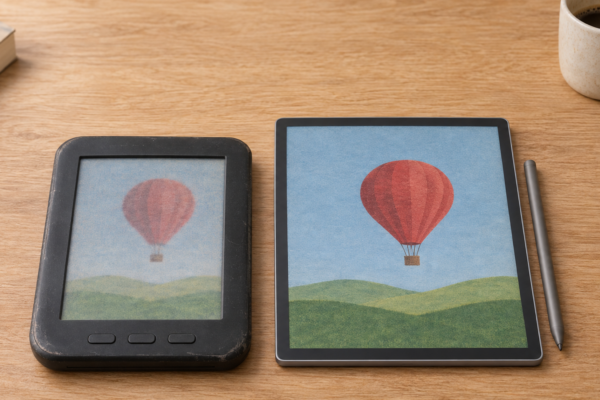
Two color E Ink tablets can look surprisingly different, even when they show exactly the same page. One might have sharper-looking text and quicker page turns. The other might produce richer illustrations but take longer to settle into its final image. That difference doesn’t necessarily come from the price, the software, or the brand. It can start with how the screen makes color in the first place.
That’s the Kaleido vs Gallery story. Kaleido places a color filter over traditional black-and-white E Ink. Gallery skips the filter and makes color directly with several colored ink pigments. Both are clever. Neither is perfect.
So which approach is better? It depends on what you read and how you use your device. This guide compares the two on color quality, sharpness, brightness, refresh speed, ghosting, battery life, and the real devices you can buy, including the new Kaleido 4.
In this guide
- Kaleido vs Gallery — The Key Differences at a Glance
- How Did Kaleido and Gallery Evolve?
- How Kaleido and Gallery Actually Produce Color
- Kaleido vs Gallery — Color Quality and Accuracy
- Resolution and Text Sharpness — Does Gallery Have an Advantage?
- Refresh Speed — Why Kaleido Often Feels Faster
- Ghosting, Flashing, and Image Stability
- Screen Brightness, Contrast, and Front Lighting
- Kaleido vs Gallery — Battery Life and Power Consumption
- Which Technology Is Better for Real-World Use?
- Real Devices — What Kaleido and Gallery Look Like in Practice
- Should You Buy Kaleido or Gallery?
- Will Kaleido Eventually Catch Up With Gallery?
- Frequently Asked Questions
- Kaleido vs Gallery — Which One Should You Choose?
Kaleido vs Gallery — The Key Differences at a Glance
Here’s the short version:
- Kaleido adds a color filter array (CFA) on top of a standard black-and-white E Ink layer.
- Gallery uses multiple colored pigments inside the ink to create color at each pixel, without that kind of filter.
- Both are reflective. They use the light around you, like paper, instead of shining light at your eyes.
- Both are bistable. An image stays on screen without constant power.
Those different designs lead to different strengths and weaknesses.
| Feature | E Ink Kaleido | E Ink Gallery |
|---|---|---|
| Color production | Color filter array | Multiple colored pigments |
| Display architecture | Monochrome E Ink plus CFA | Multi-pigment electrophoretic ink |
| Color resolution | Generation-dependent (150 PPI on Kaleido 3) | Generation-dependent (300 PPI specified on Gallery 3) |
| Color appearance | Often more muted | Usually richer |
| Reflectance | Reduced by the filter | Different trade-offs; no true black pigment |
| Refresh performance | Usually quicker for everyday interaction | Strongly dependent on the color mode |
| Ghosting | Depends on waveform and device | Depends on waveform and device |
| Typical applications | E-readers, digital notebooks, Android tablets | Color notebooks and a few color readers |
| Main trade-off | Light lost in the filter | Slower, more complex color updates |
Specifications tell only part of the story. Two devices with the same display family can feel very different, because front lights, processors, refresh settings, and software all change the result.
How Did Kaleido and Gallery Evolve?
Before Kaleido — Triton and the Early Color E Ink Era
E Ink’s first commercial color display, Triton, arrived in 2010. It used a color filter over black-and-white E Ink and showed 4,096 colors. Triton 2 followed a couple of years later in devices such as the jetBook Color 2 and PocketBook Color Lux.
The idea was right. The results weren’t. Colors looked pale, color resolution was low, and the devices were expensive. Color E Ink stayed a niche for most of the decade.
The Arrival of Kaleido
Kaleido brought the filter approach back with better materials. The first devices shipped in 2020, including the PocketBook Color e-reader. They showed 4,096 colors, with black text at 300 PPI and color at about 100 PPI.
Kaleido Plus (2021) improved the front light and screen assembly, which made colors look more saturated. Kaleido 3 (2022) was the big jump. Color resolution doubled to 150 PPI, and E Ink claimed 30% more color saturation than Kaleido Plus. Kaleido 3 went mainstream in 2024 with Kobo’s first color e-readers.
Kaleido 4, announced in October 2026, is the newest generation. E Ink claims more color, brighter whites, and better contrast. Only one device has been announced so far.
From Advanced Color ePaper to Gallery 3
Gallery took a separate path. E Ink showed Advanced Color ePaper (ACeP) publicly in 2016. It puts several colored pigments in each cell, so every pixel can produce color itself.
The first Gallery displays were aimed at signage. They were very slow: E Ink says black-and-white updates took about 2 seconds and color updates about 10. Gallery Plus, which came around 2021, stayed in signage. It came in large sizes such as 25.3 and 28 inches and was used on Taipei Metro signs.
Gallery 3, launched in April 2022, was the first Gallery display built for reading and writing. It cut black-and-white updates to 350 milliseconds and added pen support. Mass production began in late 2022, and early devices included the Bigme Galy and PocketBook Viva.
Why Both Technologies Continue to Exist
Neither design solves every problem. Filters cost brightness. Pigments cost speed. So E Ink keeps developing both, and device makers choose the trade-off that suits their product. For the full history of color E Ink, see Color E Ink Explained: From Early Displays to Kaleido 4 and Beyond and E Ink’s own history of color ePaper.
How Kaleido and Gallery Actually Produce Color
How Kaleido Works — Adding Color to Black-and-White E Ink
Picture a black-and-white photo. Now lay a transparent sheet with tiny red, green, and blue squares on top. Where the photo is white, light shines through the squares, and you see color. Where it’s black, you see dark. That’s Kaleido.
Underneath is a normal black-and-white E Ink layer doing all the work. On top sits the color filter array. Light passes through the filter, bounces off the white particles, and comes back colored.
Two consequences follow. The filter absorbs some light, so the whole screen looks darker than a black-and-white one. And it takes several black-and-white pixels to make one color pixel, so color resolution is lower than text resolution.
How Gallery Works — Producing Color With the Ink Itself
Gallery 3 has no color filter. Each cell holds four kinds of pigment particles: cyan, magenta, yellow, and white. They differ in size and charge.
Carefully timed electrical pulses push some particles toward the surface and hold others back, much like layering inks on a printed page. Each pixel can show color on its own.
The catch is that sorting four particle types takes several steps. Simple changes are quick. Getting the best color takes longer. That’s why Gallery 3 offers several color modes, from fast to best.
Why the Engineering Difference Matters
- Color richness: Gallery usually wins because no filter is mixing in gray.
- Reflectance: Kaleido loses light in the filter. Gallery avoids that loss but has no black pigment, so black is a mix of colors.
- Resolution: Kaleido’s color is lower resolution than its text. Gallery can match the two.
- Refresh: Kaleido behaves much like regular E Ink. Gallery’s best color is slower.
- Power: Gallery’s multi-step color updates can use more energy per change.
- Device complexity: Gallery needs more careful tuning of how the screen is driven.
For the underlying physics, see How Do E Ink Displays Work?.
Kaleido vs Gallery — Color Quality and Accuracy
Which Technology Produces Richer Colors?
On current hardware, Gallery 3 generally produces richer, more saturated color than Kaleido 3. That’s not only marketing. The eBook Reader compared a Gallery 3–based reMarkable Paper Pro with a Kaleido 3 tablet and found Gallery’s color better, calling it “impressive for E Ink.” It added that it still doesn’t match even a cheap LCD.
Color counts don’t settle the matter. Kaleido 3 is specified at 4,096 colors. Gallery figures vary: PocketBook quoted about 15,000 for its Viva, and reMarkable says up to 20,000 for its Gallery 3–based screens. These numbers aren’t measured the same way, so treat them as rough guides.
Why Kaleido Colors Can Look Washed Out
Every color filter absorbs light. On Kaleido, light passes through the filter twice, on the way in and on the way out. What comes back is dimmer and grayer, so colors look pastel.
Ambient light makes a big difference. In bright daylight, Kaleido colors look much better. Indoors, they flatten out unless the front light is on.
Does Gallery Really Look More Like Printed Color?
Often, yes. Building color from cyan, magenta, and yellow pigment is closer to how a printer works, and the colors look more natural.
But “print-like” doesn’t mean print quality. The eBook Reader found the Paper Pro’s whites darker and slightly yellow next to black-and-white E Ink, and said black text looked more like dark blue. One owner reported that a later software update reduced the yellow tint. Again, the device matters.
Can Either Technology Reproduce Photographs Accurately?
Not really. Smooth gradients such as skies and skin tones can look banded or grainy on both. Fine detail suffers on Kaleido because of its lower color resolution. Gallery handles photos better, but neither comes close to a phone or iPad. If accurate photos matter to you, E Ink isn’t the right screen.
What Changed With Kaleido 4?
On October 15, 2026, E Ink announced Kaleido 4 and claimed these gains over Kaleido 3:
- Color gamut volume doubled to more than 40K
- 15% higher white reflectance
- 50% better contrast
These are manufacturer claims. E Ink hasn’t given a unit for the 40K figure, and it isn’t a count of displayable colors. So you can’t line it up against Gallery 3’s color figures. Kaleido 4 may narrow the color gap, but nobody can say it beats Gallery 3 until comparable tests exist. Read the official Kaleido 4 announcement, and our analysis in Can Kaleido 4 Make Color E Ink Better Without Turning Up the Light?.
Resolution and Text Sharpness — Does Gallery Have an Advantage?
Understanding 300 PPI Black-and-White and 150 PPI Color
Kaleido 3 is specified at 300 PPI for black and white and 150 PPI for color, according to E Ink’s Kaleido 3 page.
Think of a mosaic. Black text uses every tile. Color needs a small group of tiles under red, green, and blue filters to make one colored dot. Same screen, two resolutions.
Gallery 3’s 300 PPI Resolution
E Ink specifies Gallery 3 at 300 PPI for both black and white and color, because every pixel can make its own color. That’s a real advantage for detailed color images.
Finished devices can differ, though. reMarkable’s Paper Pro runs at 229 PPI and the Paper Pro Move at 264 PPI, because reMarkable chose those panel sizes and resolutions.
Which Is Better for Reading Ordinary Text?
For plain black text, Kaleido often holds up better than you’d expect. Its text is drawn by a true black-and-white layer at 300 PPI. Gallery has no black pigment, so its blacks are mixed, and The eBook Reader described Gallery 3 text as “more jagged and rough” up close.
Font rendering, front lights, and software also play a role. And neither matches a good black-and-white screen for crisp, high-contrast text.
Which Is Better for Small Text, Footnotes, and PDFs?
Screen size matters as much as pixel density here. A 10.3-inch Kaleido 3 tablet showing a full PDF page will be easier to read than a 7-inch screen of either type, because the text is bigger to begin with. Zoom, reflow, and cropping tools also matter.
Practical verdict: for dense text and PDFs, choose by screen size and software first. Between the two technologies, Kaleido’s black-and-white text layer gives it a slight edge for text-heavy pages.
Refresh Speed — Why Kaleido Often Feels Faster
What Does Refresh Speed Actually Mean?
Refresh is how the screen changes from one image to the next. A partial refresh updates only part of the page and is quick. A full refresh redraws everything, often with a brief flash, to clean up leftovers. Some updates also take a moment to settle into their final appearance.
Kaleido Refresh Performance
Kaleido is still black-and-white E Ink underneath. It switches pixels much like a normal E Ink screen, while the filter adds color passively. That keeps page turns and menus responsive.
How fast it actually feels depends on the device. The display controller, the waveforms (the electrical patterns that move the particles), the processor, and the refresh modes the manufacturer offers all change the experience. That’s why Boox claims its Note Air6 C turns pages up to 40% faster than the Note Air5 C, even though both use Kaleido 3.
Gallery 3 Refresh Performance
E Ink lists these update times for Gallery 3 on its Gallery 3 page:
- Black and white: 350 ms
- Fast color: 500 ms
- Standard color: 750–1,000 ms
- Best color: 1,500 ms
- Pen input: 30 ms
These are display specifications, not benchmarks for any particular device. A device maker can tune them, and real-world speed also depends on the rest of the hardware.
Does Faster Refresh Mean Better Image Quality?
On Gallery, faster usually means lower quality. Fast color modes can leave traces of the previous image, while best color looks great but takes about one and a half seconds. Liliputing’s coverage of the PocketBook Viva noted that fast modes suit browsing, while best color suits comics and detailed content.
What About Kaleido 4’s Video Capability?
E Ink says Kaleido 4 can play video at up to 18 frames per second. That’s a real improvement for E Ink, but it’s still below the 24–30 frames per second of standard video, with muted color. Short clips, yes. Movies, no.
Ghosting, Flashing, and Image Stability
Why Ghosting Happens
Ghosting is a faint trace of the previous image left behind after a page change. It happens when some particles don’t fully move to their new position.
Does Kaleido Ghost More Than Gallery?
There’s no simple answer. Ghosting depends on the waveform, the refresh mode, and how often the device does a full refresh. A well-tuned Kaleido device can look cleaner than a poorly tuned Gallery one, and vice versa.
Why Gallery Can Show Intermediate Colors During Updates
When a Gallery screen changes, the pigments move in stages. You may briefly see odd colors or flashes before the final image appears. That’s the screen sorting its particles. Amazon reportedly cited flashing, ghosting, and latency as reasons it chose a color filter design for its color Kindles.
Which Technology Is Less Distracting?
For novels, both are fine, and black-and-white text updates are similar. For menus and scrolling documents, Kaleido usually feels calmer and quicker. For illustrations that stay on screen, Gallery’s slower update is a fair price for better color. For writing notes, both use fast pen modes, so the software matters most. For more on flashing, see Why Does an E Ink Screen Flash Black? Full Refreshes and Ghosting Explained.
Screen Brightness, Contrast, and Front Lighting
Why Some Color E Ink Screens Look Darker
Every extra layer between your eyes and the ink costs some light: color filters, touch layers, coatings, and front-light guides. Color screens have more of these layers than black-and-white ones, so their white looks grayer.
Does Gallery Avoid Kaleido’s Color-Filter Problem?
Partly. Without a filter, Gallery loses less light that way. In The eBook Reader’s comparison, the Gallery 3 background was darker than regular E Ink but not as dark as Kaleido 3. The trade-off is weaker blacks, because black is made from mixed pigments.
Does Kaleido 4 Improve Reflectance Enough?
E Ink claims 15% higher white reflectance than Kaleido 3. That would help, but E Ink hasn’t published absolute figures. So we can’t yet say whether Kaleido 4 matches Gallery 3’s brightness or black-and-white E Ink.
Which Looks Better Outdoors?
Both look their best in daylight, because reflective screens get brighter as the light gets brighter. Glare and anti-glare coatings matter as much as the display family. Either one beats a phone screen in direct sunlight.
Which Is Better for Reading at Night?
At night, you’re reading by the front light, so the finished device matters most. Look for an even, adjustable light with warm color options. A good front light on either technology beats a mediocre one on the other.
Kaleido vs Gallery — Battery Life and Power Consumption
Both technologies are bistable, so a still image uses almost no power. Energy goes into changing the image.
That’s where they can differ. Gallery’s best color modes use a longer, more complex sequence of pulses, which can mean more energy per page change. Kaleido drives a simpler black-and-white layer. But in practice, the front light, processor, wireless radios, and software usually affect battery life far more than the display family. An Android tablet running apps will drain faster than a simple e-reader, whatever screen it uses.
Don’t assume Kaleido or Gallery is automatically more power-efficient. Compare the battery claims and independent reviews of the actual devices.
Which Technology Is Better for Real-World Use?
Reading Novels
Neither adds much. A good black-and-white E Ink screen gives you the brightest page and sharpest text. Color only shows up in book covers.
Reading Comics and Graphic Novels
Here it’s genuinely close. Gallery’s richer color suits painted artwork. Kaleido’s quicker page turns suit fast reading. Screen size matters a lot: full comic pages work much better at 10 inches or more.
Reading Manga
Most manga is black and white, so color adds little. A monochrome reader will usually look sharper and brighter.
Studying and Reading Textbooks
Color helps with diagrams, maps, and color-coded notes. Both technologies handle this well. Kaleido’s quicker page handling helps when you’re flipping back and forth.
Reviewing PDFs and Business Documents
Charts and slides benefit from color, but small text needs a large screen. Pick by screen size and PDF tools first. Kaleido’s 300 PPI text layer is a small plus.
Handwriting and Digital Note-Taking
Both support styluses well. Gallery 3 has a fast 30 ms pen mode, and color ink in your notes looks rich. Kaleido devices from BOOX and Kobo are quick and flexible. The note-taking software will shape your experience more than the screen.
Sketching and Digital Art
Neither replaces a drawing tablet or iPad. Colors are limited, and updates are slow. They’re fine for color sketches and annotations.
Web Browsing and Video
Kaleido handles scrolling better. Gallery’s color modes make scrolling slow and messy. For video, neither is good.
| Use case | Better choice | Reason |
|---|---|---|
| Novels | Consider monochrome | Brightest page, sharpest text |
| Comics | Depends on priorities | Gallery for color, Kaleido for speed |
| Manga | Usually monochrome | Little need for color |
| Textbooks | Either; Kaleido for quick flipping | Diagrams work on both |
| PDFs | Device-dependent | Screen size, scaling, software |
| Note-taking | Device-dependent | Stylus and software matter most |
| Color illustrations | Gallery may appeal | Multi-pigment color |
| Frequent scrolling | Usually Kaleido | Responsiveness |
| Video | Neither ideal | E Ink refresh limits |
Real Devices — What Kaleido and Gallery Look Like in Practice
Devices Using Kaleido
Kaleido 3 is the most common color E Ink display today. You’ll find it in:
- Kobo: Clara Colour (6-inch) and Libra Colour (7-inch)
- BOOX: Go Color 7 Gen II (7-inch), Note Air5 C, and the new Note Air6 C (both 10.3-inch)
- PocketBook: color models such as the InkPad Color 3
- Bigme: color tablets such as the B751C
Amazon’s Kindle Colorsoft and Kindle Scribe Colorsoft also use a color filter design. Amazon calls them custom Colorsoft displays rather than naming an E Ink generation.
Devices Using Gallery 3
Gallery 3 has far fewer devices. The early ones were the Bigme Galy and PocketBook Viva (both 8-inch, 2023). Today the best-known are reMarkable’s Paper Pro (11.8-inch) and Paper Pro Move (7.3-inch).
reMarkable built its own “Canvas Color” display on top of Gallery 3, with its own front light and software tuning. It’s a good reminder that the finished product can differ from E Ink’s reference specs.
Where Kaleido 4 Fits
The Hanvon M10C II note-taker is the first announced Kaleido 4 device. It’s initially aimed at China, with no announced US price or release date. E Ink says it turns pages and scrolls 27% faster, but that figure combines the new display with Hanvon’s own refresh technology and controller. For now, you can’t buy Kaleido 4 in the US.
Why Comparing Two Devices Is Not the Same as Comparing Two Display Technologies
A Kobo Libra Colour and a reMarkable Paper Pro differ in far more than their screens: screen size, operating system, note-taking software, stylus, front-light design, refresh tuning, and price all differ too. When reviewers compare devices, they’re comparing whole products. Keep that in mind before blaming or crediting the display alone.
Affiliate disclosure: Einkopedia may earn a commission from qualifying purchases made through links on this page, at no extra cost to you. This doesn’t influence our recommendations.
Display technology matters, but the device built around it matters just as much. If you’re considering a color E Ink reader or notebook, the Kobo Libra Colour (Kaleido 3) and the reMarkable Paper Pro (Gallery 3) are good examples of each approach. Our guide to the best E Ink tablets in 2026 covers more options.
Should You Buy Kaleido or Gallery?
Choose Kaleido If…
You want quick page turns and menus, you flip through pages often, or you use apps on an Android tablet. It’s also the safer choice for general reading with some color, and for color PDF markup. And you’ll have far more devices to choose from, from 6-inch readers to 10.3-inch notebooks.
Consider Gallery If…
Rich color matters more to you than speed. That fits illustrated books, color-heavy notes, and sketches, or if you specifically want a device like the reMarkable Paper Pro for its writing workflow. Be ready for slower color updates and some flashing.
Consider Monochrome E Ink Instead If…
You mostly read novels, long articles, or text-heavy documents. A black-and-white screen gives you the brightest page and sharpest text.
What Should Buyers Check Before Purchasing?
- The exact display generation (Kaleido 3, Gallery 3, a custom display or Kaleido 4)
- Screen size
- Black-and-white and color resolution
- Front light quality and warm-light options
- Refresh modes and page-turn speed
- Software ecosystem and bookstore access
- Stylus support, and whether the pen is included
- Battery life
- Warranty and support
- Current price
| Device | Display technology | Screen size | Best for | Main drawback | Check current price |
|---|---|---|---|---|---|
| Kobo Libra Colour | Kaleido 3 | 7 inches | Color reading with page buttons | Stylus sold separately | Check price on Amazon |
| BOOX Note Air6 C | Kaleido 3 | 10.3 inches | Color PDFs, notes and Android apps | Android adds complexity | Check price on Amazon |
| Kindle Scribe Colorsoft | Amazon custom color filter display | 11 inches | Kindle books and notes in color | Tied to Amazon’s ecosystem | Check price on Amazon |
| reMarkable Paper Pro Move | Canvas Color (based on Gallery 3) | 7.3 inches | Portable color note-taking | Not a full e-reader | Check price on Amazon |
| reMarkable Paper Pro | Canvas Color (based on Gallery 3) | 11.8 inches | Rich color notes and documents | Slower color updates | Check price on Amazon |
If you mostly read scanned documents, see our guide to the best E Ink tablets for PDFs.
Will Kaleido Eventually Catch Up With Gallery?
Kaleido 4 is E Ink’s clearest attempt yet to close the gap. If its claimed gains in color, reflectance, and contrast hold up, Kaleido could keep its speed advantage while getting much closer to Gallery’s color. That’s confirmed as a claim, not yet as a result.
Gallery could improve too, with faster color sorting and better blacks. But E Ink hasn’t announced a successor to Gallery 3 for e-readers, so that’s a possibility rather than a plan.
Cost matters as well. Kaleido rides on mature black-and-white E Ink production, which helps keep devices affordable and plentiful. Gallery devices remain fewer and pricier. Expect both to keep evolving side by side, rather than one replacing the other.
Frequently Asked Questions
Is Kaleido Better Than Gallery?
Not overall. Kaleido is usually faster and more widely available. Gallery usually has richer color. The better choice depends on what you read.
Is Gallery 3 Better Than Kaleido 3?
For color quality and color resolution, generally yes. For speed, plain text, and device choice, Kaleido 3 usually wins.
How Does Kaleido 4 Compare With Gallery 3?
We don’t know yet. E Ink claims big gains for Kaleido 4, but there’s no independent testing and only one China-focused device so far.
Which Has Better Color Accuracy?
Gallery 3, in current devices. Neither is accurate enough for photo work.
Which Has Sharper Text?
Kaleido often looks crisper for plain black text, thanks to its black-and-white layer. Gallery has higher color resolution.
Which Is Faster for Page Turning?
Kaleido, in most devices. Gallery 3’s black-and-white mode is quick, but its color modes take 0.5–1.5 seconds.
Does Gallery 3 Support Handwriting?
Yes. E Ink specifies a 30 ms pen mode, and reMarkable’s Paper Pro tablets are built around it.
Which Technology Is Better for Comics?
It depends. Gallery offers richer color. Kaleido offers faster page turns. Choose a larger screen either way.
Which Is Better for PDFs?
Choose by screen size and software first. Kaleido’s sharper black text is a small plus.
Does Kaleido or Gallery Use More Battery?
Gallery’s best color updates can use more energy, but the front light, processor, and software usually matter more.
Why Do Color E Ink Screens Look Darker?
Color filters and extra layers absorb light, and Gallery’s pigment-mixed blacks lower contrast.
Will Color E Ink Ever Match an iPad’s Colors?
Not in the foreseeable future. Reflective screens can’t match the brightness and saturation of screens that make their own light.
Kaleido vs Gallery — Which One Should You Choose?
Kaleido and Gallery aren’t two versions of the same display. They’re two different answers to one hard problem: getting usable color onto electronic paper.
Kaleido is usually the more practical choice for responsive, everyday reading, page flipping, and annotation, and you’ll find it in far more devices. Gallery is the appealing alternative when rich color matters more than speed. Results still depend on the generation and the finished device, and neither one is automatically better for every reader.
Choose the display that suits what you read and how you use your device, not simply the one with the newest technology or most impressive specifications.
Still deciding? Explore Einkopedia’s guide to the best E Ink tablets and compare the devices that make the most sense for your reading and note-taking needs.