Black-and-white E Ink had one job: make digital reading feel more like reading on paper. And it did that remarkably well. But books aren’t always black and white. Comics, illustrations, textbooks, maps, and handwritten notes often depend on color, and bringing those colors to electronic paper proved far more complicated than adding a color screen to a Kindle.
So why did it take more than two decades for electronic paper to show usable color? And how close has it come to a printed color page?
The answer runs through four families of technology. Triton was the first commercial attempt. Kaleido made color e-readers mainstream. Gallery took a completely different route to full color. Spectra quietly took over store shelves and signage. The newest chapter is Kaleido 4, announced in October 2026, which promises brighter, punchier color but hasn’t been independently tested yet.
By the end of this guide, you’ll understand how each technology works, what actually improved from one generation to the next, which trade-offs remain, and whether a color E Ink device makes sense for what you read.
In this guide
- What Is Color E Ink?
- The Evolution of Color E Ink — From Early Experiments to 2026
- How Does Color E Ink Actually Work?
- Every Major Color E Ink Technology Explained
- Kaleido vs Gallery vs Spectra — Which Is Actually Better?
- How Good Does Color E Ink Actually Look?
- Color E Ink vs LCD vs OLED — What’s the Difference?
- Where Is Color E Ink Used Today?
- Should You Buy a Color E Ink Device or Stick With Black and White?
- What Still Needs to Improve in Color E Ink?
- Common Myths About Color E Ink
- Frequently Asked Questions About Color E Ink
- Has Color E Ink Finally Come of Age?
What Is Color E Ink?
Standard E Ink screens are filled with millions of tiny capsules or cells containing charged black and white particles. An electric field pulls one color to the surface and pushes the other down, and the pattern forms text and images. If you want the basics first, start with our guide to what E Ink technology is.
Color E Ink keeps that same idea and adds color, either by placing a color filter over the black-and-white layer or by putting colored particles into the ink itself.
What it doesn’t do is glow. LCD and OLED screens create their own light. E Ink is reflective, so it uses the light around you, just like paper. A front light, where fitted, sits on top and shines down onto the surface instead of into your eyes.
E Ink is also bistable. Once the particles are in place, they stay there without power, which is why an e-reader can show a book cover for weeks while switched off. Power is mainly used when the image changes.
One naming note: “color E Ink” refers to display technologies from E Ink Holdings. Other companies make color reflective displays that work differently, so not every “color e-paper” product uses E Ink.
Why Is Producing Color on E Ink So Difficult?
Think about printing. A black-and-white page needs one ink on white paper. A color illustration needs a printer to lay down several inks in precisely the right amounts and positions.
Now imagine that printer has to reprint the page every time you turn it, in under a second, using only electric fields to herd microscopic particles. That’s the color E Ink problem.
Each solution has a cost. A color filter is relatively fast, but every filter layer absorbs some of the light that would otherwise bounce back, so the screen looks darker. Using multiple colored pigments avoids the filter, but the display has to sort particles that differ in size and charge, which takes more time and more complicated driving signals. Better color, faster refresh and brighter whites constantly pull against each other. For the deeper physics, see how E Ink displays work.
The Evolution of Color E Ink — From Early Experiments to 2026
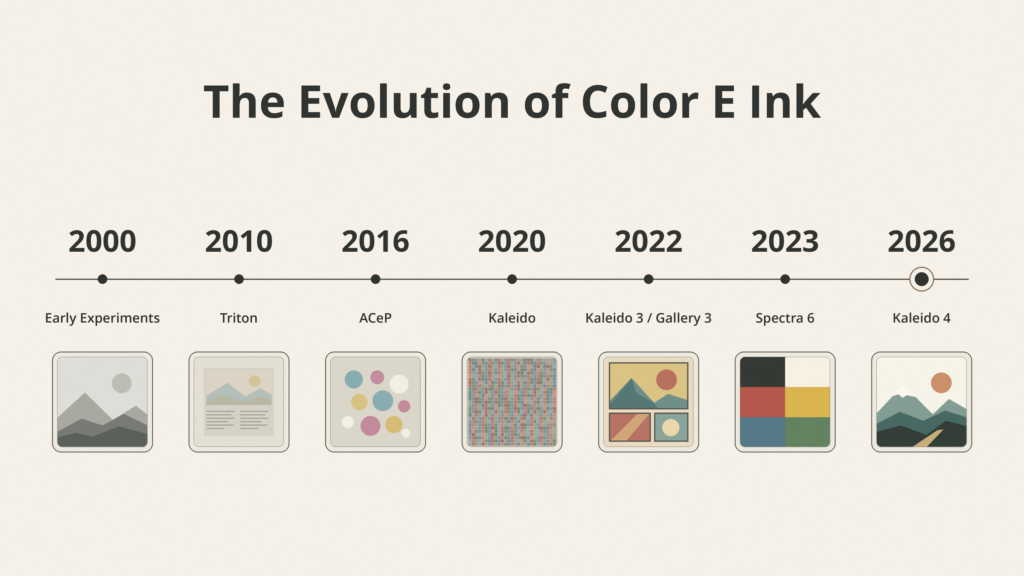
Here’s the short version before the details. Note that an announcement and an actual product on store shelves are often a year or more apart.
| Year | Milestone |
|---|---|
| 2000–2001 | E Ink experiments with both color filters and multiple pigments |
| 2010 | E Ink Triton introduced, the first commercial color E Ink |
| 2012–2014 | Triton 2 appears in devices such as the jetBook Color 2 and PocketBook Color Lux |
| 2015 | E Ink Prism introduced for color-changing surfaces |
| 2016 | Advanced Color ePaper (ACeP) shown publicly |
| 2018 | First-generation Gallery (ACeP) for signage |
| 2020 | First Kaleido devices ship, including the Hisense A5C phone and PocketBook Color |
| 2021 | Kaleido Plus announced |
| April 2022 | Kaleido 3 and Gallery 3 announced |
| 2023 | Spectra 6 announced for signage |
| 2024 | Kaleido 3 goes mainstream in Kobo and Kindle e-readers; reMarkable launches a Gallery 3–based tablet |
| October 2026 | Kaleido 4 announced; Hanvon M10C II named as first device |
Early Color E Ink Experiments (2000–2009)
E Ink was experimenting with color almost from the start. According to the company’s own history, it tested both color filter arrays and multi-pigment inks as early as 2000 and 2001.
Both approaches showed promise, but neither was ready. Filters made screens dim. Multiple pigments were slow and hard to manufacture. Meanwhile, black-and-white E Ink was good enough to sell, reaching consumers through readers like Sony’s Librie in 2004 and Amazon’s first Kindle in 2007. Monochrome won the race because it solved the core problem of comfortable reading.
E Ink Triton (2010) — The First Major Commercial Step
E Ink introduced Triton in 2010. It placed a color filter over a standard black-and-white panel, with red, green, blue, and white sub-pixels in a 2×2 grid, and could show 4,096 colors.
Early adopters included Hanvon in China and Ectaco, whose jetBook Color was aimed at schools. Triton 2 refined the filter layout and contrast and powered devices such as the 9.7-inch jetBook Color 2 and the 8-inch PocketBook Color Lux, one of the first color E Ink readers with a front light.
Triton never broke through. Colors looked pale unless the room was brightly lit, color resolution was low, and the devices were expensive. An E Ink manager told Good e-Reader at the time that high pricing from early licensees had held the technology back.
The Development of Advanced Color ePaper
E Ink’s other path surfaced publicly in 2016 as Advanced Color ePaper (ACeP). Instead of filtering light, ACeP uses several types of colored pigment particles that differ in size and charge, so every pixel can produce color on its own.
That’s a fundamentally different problem from adding a filter. The display must move the right particles to the right depth in the right order, which is why early ACeP screens took seconds to refresh. ACeP became the foundation of the Gallery brand, first aimed at signage in 2018.
Kaleido Arrives (2019–2020)
Kaleido, which E Ink also called Print Color in early materials, returned to the filter approach with a newer printed color filter array paired with E Ink’s faster Carta ink.
The first products arrived in 2020. The Hisense A5C, a 5.84-inch Android phone, was arguably the first. The PocketBook Color followed as one of the first mass-market Kaleido e-readers. Both showed 4,096 colors, with black-and-white text at 300 PPI and color at roughly 100 PPI on the 6-inch reader.
Colors were still muted, but for the first time, a color E Ink reader felt practical rather than experimental.
Kaleido Plus and Kaleido 3 (2021–2022)
Kaleido Plus, announced in March 2021, kept the same basic color reproduction but improved the front light and screen assembly. E Ink claimed the redesigned front light tripled the color gamut when switched on, and the glass-free filter made larger 7.8-inch panels possible.
Kaleido 3, announced in April 2022, was the bigger step. Color resolution rose to 150 PPI on a 300 PPI panel, and E Ink claimed 30% more color saturation than Kaleido Plus. This is the generation that finally reached mainstream e-readers from Kobo and Amazon in 2024.
Gallery 3 and the Expansion of Full-Color E Ink (2022 Onward)
Also in April 2022, E Ink launched Gallery 3, an ACeP display for e-readers and note-takers. It uses cyan, magenta, yellow and white particles, and E Ink says it can show more than 50,000 colors at up to 300 PPI.
The headline was speed. First-generation Gallery needed about two seconds for black-and-white updates and ten for color. Gallery 3 cut that to 350 milliseconds for black-and-white and 500 to 1,500 milliseconds for color, depending on quality mode.
Mass production started at the end of 2022, but adoption stayed narrow. The best-known Gallery 3 devices today are reMarkable’s Paper Pro tablets.
Kaleido 4 (2026) — The Latest Step Forward
On October 15, 2026, E Ink announced Kaleido 4. It targets the long-standing complaints about color E Ink: dim whites, low contrast, and grainy color.
The claims are significant, but they are the manufacturer’s numbers. We’ll unpack them in the technology breakdown below. You can also read E Ink’s history of color ePaper.
How Does Color E Ink Actually Work?
There are two main ways to put color on electronic paper. Almost every product you can buy uses one of them.
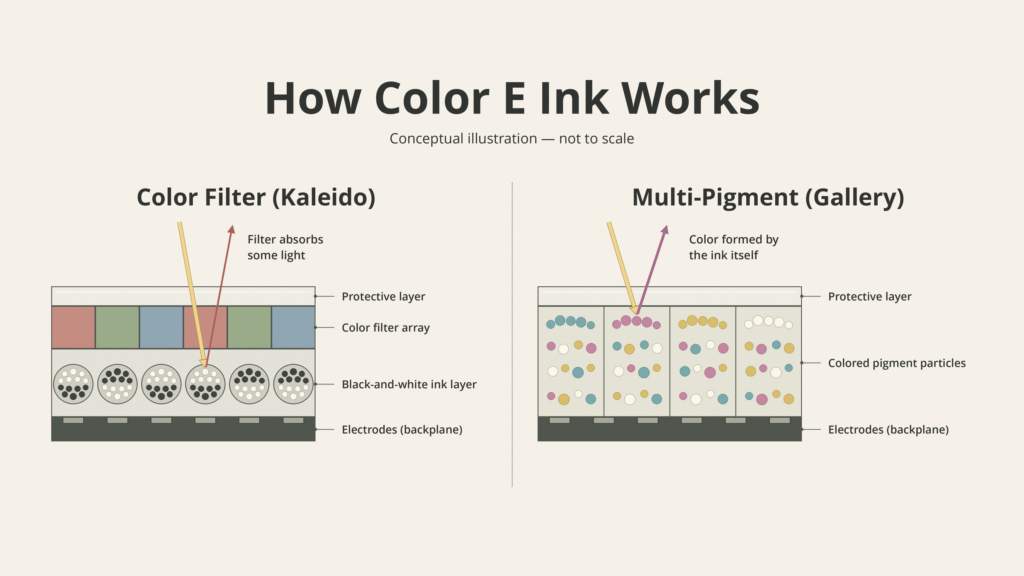
Method 1 — A Color Filter Over Black-and-White E Ink
Start with a normal black-and-white E Ink panel. Now place a very thin sheet of tiny red, green, and blue squares on top. That sheet is a color filter array (CFA).
The black-and-white layer underneath still does all the work. When it turns white beneath a red square, light passes through the filter, bounces off the white particles, and comes back red. Turn the neighbors dark, and you control which colors mix.
Two side effects follow. First, the filter absorbs some light, so the screen reflects less light than a monochrome screen. Second, it takes a group of black-and-white pixels to make one color pixel, so color resolution is lower than text resolution. Kaleido uses this method.
Method 2 — Creating Color With the Ink Particles Themselves
Here there’s no filter. Each cell contains several colored pigments, such as cyan, magenta, yellow, and white, each with a different size or charge.
By applying carefully timed voltage patterns, the display pulls particular pigments toward the surface and keeps others back, much like layering inks on paper. Each pixel can show color directly, so color resolution can match the panel resolution.
The catch is speed. Sorting four particle types takes longer than flipping black and white, so refresh is slower and some color changes involve visible flashing. Gallery uses this method.
Why These Two Methods Matter
| Factor | Color filter (Kaleido) | Multi-pigment (Gallery) |
|---|---|---|
| Brightness | Dimmer, as the filter absorbs light | No filter loss, but whites can look less bright depending on the stack |
| Color appearance | Muted, pastel-like | Richer, more print-like |
| Resolution | Color lower than black-and-white | Color can match full panel resolution |
| Refresh speed | Fast, close to monochrome | Slower, especially in best-color modes |
| Power use | Similar to monochrome E Ink | More energy per full-color update |
| Device design | Easy to adapt existing e-reader designs | Needs custom tuning for writing and page turns |
For a more detailed look at the particle physics, see how E Ink displays work.
Every Major Color E Ink Technology Explained
E Ink Triton and Triton 2
Triton was the proof of concept. It could display 4,096 colors and 16 levels of gray, but in typical indoor light the colors looked washed out, and color resolution was low. On the PocketBook Color Lux, for instance, the 8-inch panel ran at 800 × 600.
Triton 2 improved contrast and changed the filter layout, but it couldn’t solve the brightness problem without a front light. With few devices and high prices, it faded away well before Kaleido arrived.
E Ink Kaleido — The First Generation
The original Kaleido put a printed color filter on top of E Ink’s Carta black-and-white film. That kept black-and-white text sharp at 300 PPI on small panels, while color was shown at around 100 PPI.
Its achievement was to make color “good enough” for book covers, simple illustrations, and highlights. Its limitations were dull colors, visible grain, and a slightly gray background compared with the best monochrome screens.
E Ink Kaleido Plus
Kaleido Plus focused on the parts readers actually notice. A redesigned front light reduced light scattering, which E Ink said made colors look more saturated when the light was on. A glass-free filter made the panel lighter and allowed larger 7.8-inch screens, used in devices like the PocketBook InkPad Color and Boox Nova3 Color.
The color count and resolution stayed broadly the same. This was a refinement, not a reinvention.
E Ink Kaleido 3
Kaleido 3 is the display behind most color e-readers sold today. According to E Ink, it offers:
- 300 PPI in black and white
- 150 PPI in color
- 4,096 colors and 16 levels of gray
- 30% more color saturation than Kaleido Plus
PPI stands for pixels per inch. It measures sharpness, not the number of colors. Good e-Reader reported that Kaleido 3 gained its color resolution by placing the filter closer to the ink layer, which also reduced light scatter.
That combination made Kaleido 3 a solid fit for comics, textbooks, illustrated books, and color-coded notes. You’ll find it, or customized versions of it, in the Kobo Libra Colour and Clara Colour, the Boox Note Air6 C and Go Color 7 Gen II, and Amazon’s Kindle Colorsoft line. Amazon says its Colorsoft displays use a custom display stack, but the color-filter trade-offs still apply. Learn more on E Ink’s Kaleido 3 page.
E Ink Kaleido 4
E Ink announced Kaleido 4 on October 15, 2026. Compared with the previous generation, the company claims:
- Color gamut volume doubled to more than 40K
- 15% higher white reflectance
- 50% better contrast
- Video playback at up to 18 frames per second, thanks to new algorithms
- A new oxide TFT backplane that supports higher driving voltages and faster refresh
These are manufacturer claims, not independent measurements. Read the full Kaleido 4 announcement.
The “40K” figure needs care. It is not 40,000 displayable colors. Gamut volume describes how much of a color space the screen can cover, and E Ink hasn’t said which unit or measurement method it used. Several outlets have noted that the number of displayable colors may still be 4,096. Resolution is also unconfirmed. Good e-Reader reported that E Ink told it Kaleido 4 keeps 300 PPI in color, but that isn’t in the official press release, so treat it as unverified until devices are measured.
The first announced product is the Hanvon M10C II, a color note-taking tablet currently aimed at China, with no announced US price or release date.
It’s also important to separate the panel from the product. E Ink says the M10C II turns pages and scrolls 27% faster, but that figure combines Kaleido 4 with Hanvon’s own refresh technology and the T2000 timing controller, which E Ink and Himax first announced in 2024. The redesigned front light and font rendering are also device features. Another manufacturer using Kaleido 4 could get different results. We cover what these claims mean for screen brightness in Can Kaleido 4 Make Color E Ink Better Without Turning Up the Light?.
E Ink Gallery, Gallery 3, and Related Developments
Gallery is E Ink’s brand for ACeP multi-pigment displays. The first Gallery panels were built for signage, where a slow update didn’t matter. Gallery 3 was the version tuned for reading and writing, with faster refresh modes and pen support.
In person, Gallery-based screens tend to look more like printed color, with deeper reds and yellows than Kaleido. The trade-off shows up when the screen changes. Full-color updates are slower, and some refreshes flash noticeably.
Implementation matters a lot. reMarkable built its own “Canvas Color” display stack on top of Gallery 3 for the 11.8-inch Paper Pro (229 PPI) and 7.3-inch Paper Pro Move (264 PPI), and reMarkable quotes about 20,000 colors rather than E Ink’s 50,000 figure. Amazon, by contrast, told Good e-Reader it chose a color filter for Kindle because the alternative suffered from too much flashing, ghosting, and latency. Same technology family, very different judgments.
E Ink Spectra — Color for Retail and Signage
Spectra was built for screens that change a few times a day, not every few seconds. Early Spectra panels showed three colors: black, white, and red. Spectra 3100 added yellow, and the 2022 Spectra 3100 Plus added orange. These became staples of electronic shelf labels.
Spectra 6, announced in April 2023, uses six pigments: black, white, red, yellow, blue, and green. E Ink lists up to 200 PPI depending on panel size, a contrast ratio of up to 30:1, and a 60,000-color gamut. Panels have since reached 75 inches. It looks rich, but it updates slowly, so it isn’t a candidate for e-readers.
E Ink Prism, introduced in 2015, is a different product again. It turns walls, furniture, and even car bodies into surfaces that change color. BMW used Prism 3 on concept cars. It isn’t designed to display text or images.
Color E Ink Technologies Compared
| Technology | Announced | Color method | Main strength | Main limitation | Typical application |
|---|---|---|---|---|---|
| Triton / Triton 2 | 2010 / ~2012 | Color filter | First commercial color | Dim, low-resolution color | Early color readers |
| Kaleido | 2019–2020 | Color filter | Practical color reading | Reduced reflectance, ~100 PPI color | E-readers, phones |
| Kaleido Plus | 2021 | Color filter | Better saturation with front light | Same core CFA limits | E-readers |
| Kaleido 3 | 2022 | Color filter | Balance of color, speed, and 300 PPI text | 150 PPI color, darker than monochrome | E-readers, tablets, monitors |
| Kaleido 4 | 2026 | Improved color-filter platform | Claimed gains in gamut, reflectance, and contrast | No independent testing yet; one device | Reading and productivity |
| Gallery (1st gen) | 2018 | Multi-pigment (ACeP) | Full color per pixel | Very slow updates | Signage |
| Gallery 3 | 2022 | Multi-pigment (ACeP) | Rich, print-like color | Slower, flashing color refresh | Note-taking, color reading |
| Spectra 3100 / Plus | ~2021 / 2022 | Multi-pigment | Low-cost accent colors | Limited palette | Shelf labels |
| Spectra 6 | 2023 | Multi-pigment (6 pigments) | Rich signage color | Slow updates | Retail and indoor signage |
| Prism | 2015 | Color-changing film | Architectural color | Not an image display | Surfaces, design |
Kaleido vs Gallery vs Spectra — Which Is Actually Better?
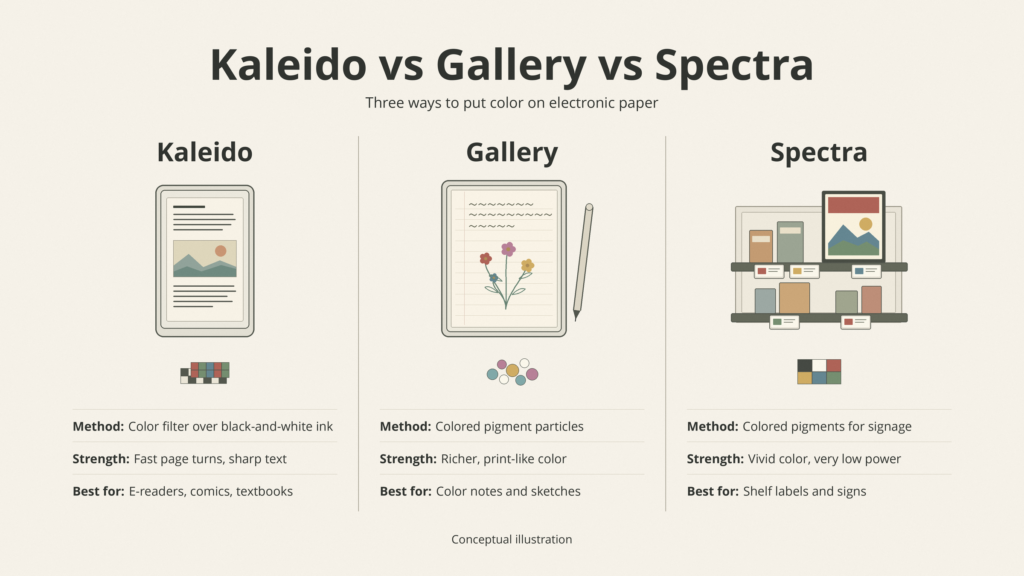
None of them wins outright. Each was designed for a different job.
Best for Reading Comics and Illustrated Books
For comics, you turn pages constantly, so refresh speed matters as much as color. Kaleido 3 handles quick page turns well, and its 300 PPI black-and-white layer keeps speech bubbles crisp. Gallery 3 colors look richer, but slower color updates can interrupt the flow. Screen size matters too; full comic pages are far more readable at 10 inches or larger.
Best for Digital Note-Taking and Productivity
Writing needs a low-latency pen and responsive page changes. Kaleido devices from Boox and Kobo are quick and flexible. reMarkable’s Gallery 3–based tablets offer a polished, print-like color experience but accept slower full-color updates. Your priority, speed or color richness, decides it.
Best for Retail Signs and Advertising
Here Spectra is the clear choice. A shelf label or poster changes rarely, so slow updates don’t matter, while vivid color and very low power use matter a lot.
| If you mainly want… | Look at |
|---|---|
| Fast page turns with color covers and comics | Kaleido 3 (or Kaleido 4 when available) |
| The richest color for notes and sketches | Gallery 3–based tablets |
| Sharp text with occasional color | Kaleido 3 |
| Signage or shelf labels | Spectra 6 / Spectra 3100 |
How Good Does Color E Ink Actually Look?
Why Colors Often Look Muted
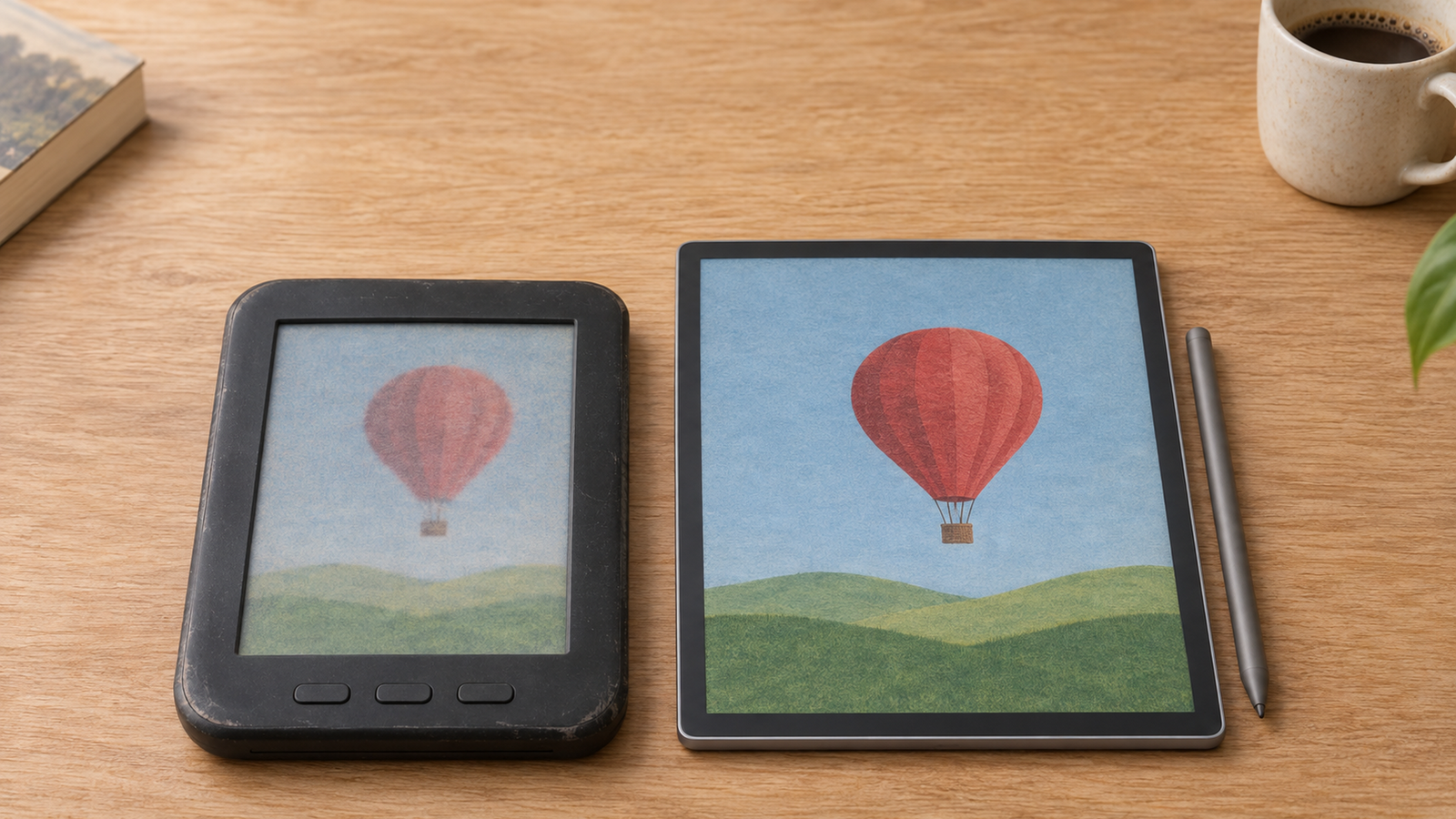
Reflective screens can only return the light that reaches them. A CFA display loses part of that light in the filter, and what comes back is mixed with surface glare. The result looks more like a color newspaper than a glossy magazine.
Lighting changes everything. Under bright daylight, colors look noticeably better. In a dim room, they flatten out unless you turn on the front light.
Why Color E Ink Screens Can Look Darker Than Monochrome Screens
Every extra layer between your eyes and the ink costs some light. Color filters, coatings, and front-light guides all add up. That’s why a color reader’s “white” often looks slightly gray next to a monochrome reader. It’s also exactly what Kaleido 4’s claimed 15% reflectance gain is trying to address.
How much darker depends on the technology and the device. Amazon, for example, redesigned the light guide on its 2026 Kindle Colorsoft with nitride LEDs to brighten color without washing out detail.
Why 300 PPI Black-and-White and 150 PPI Color Are Not Contradictory
On a Kaleido 3 screen, black text is drawn by the full 300 PPI black-and-white layer. Color, though, needs a group of those pixels sitting under red, green, and blue filters to form one color pixel. So the same screen is 300 PPI for text and 150 PPI for color. Both numbers are correct.
Can Color E Ink Reproduce Photos Accurately?
Not really. Kaleido 3’s 4,096 colors are a tiny fraction of the millions a phone shows, and gradients like skies or skin tones can look banded or grainy. Gallery-based screens do better but still fall well short of an LCD.
Here’s a practical way to think about it:
- Illustrated textbook: Works well. Diagrams and color-coded charts are perfectly readable.
- Comic book: Works, with muted color. Bold line art survives better than painted art.
- Professional photograph: Disappointing. Color accuracy and fine tonal detail aren’t there.
Color E Ink vs LCD vs OLED — What’s the Difference?
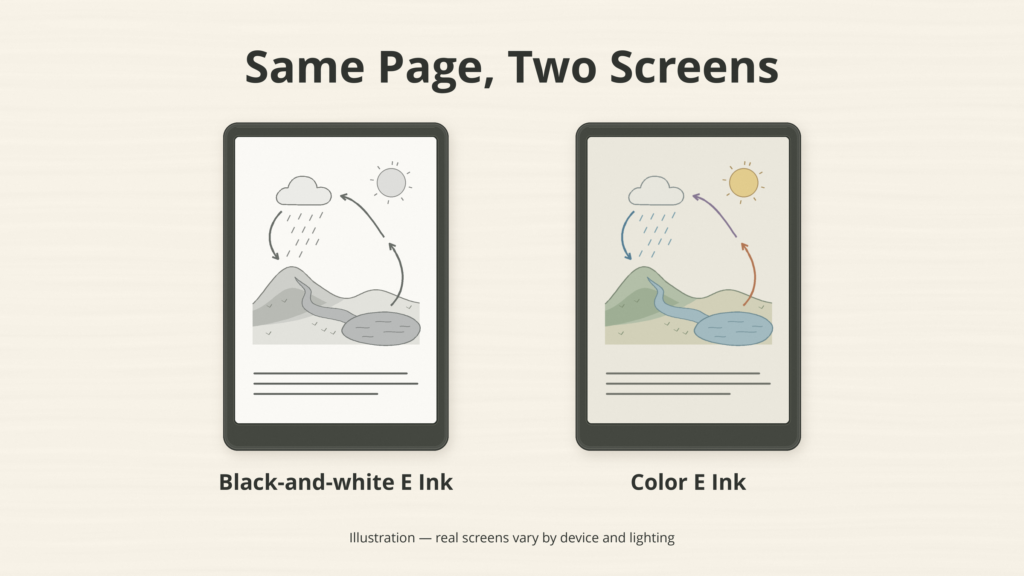
LCD and OLED screens emit light, which gives them bright, saturated color and smooth video. Color E Ink reflects light, which makes it easy to read outdoors and allows long battery life for reading, but limits color richness and speed.
| Factor | Color E Ink | LCD | OLED |
|---|---|---|---|
| Light source | Reflected ambient light, optional front light | Backlight | Self-emitting pixels |
| Color richness | Muted | Strong | Very strong |
| Refresh / video | Slow; limited video | Smooth | Smooth |
| Outdoor readability | Excellent | Fair to good | Fair to good |
| Power for static reading | Very low | Higher | Higher |
| Battery life (reading) | Weeks | Hours to days | Hours to days |
| Best for | Long reading sessions, documents | General tablet use | Media, photos, video |
Two cautions. E Ink doesn’t always use less power. Constant refreshing, an Android app running in the background, or a bright front light can drain a color E Ink tablet faster than you’d expect. And while many people find E Ink more comfortable for long reading sessions, it isn’t medically proven to prevent eye strain.
The bottom line: a color E Ink tablet can be excellent for reading documents and still be a poor replacement for an iPad. See our full E Ink vs LCD vs OLED comparison.
Where Is Color E Ink Used Today?
Color E-Readers
This is the biggest consumer category. Color covers, comics, children’s books, cookbooks, and magazines all benefit from color E Ink technology, along with colored highlights in your own books.
Digital Notebooks and E Ink Tablets
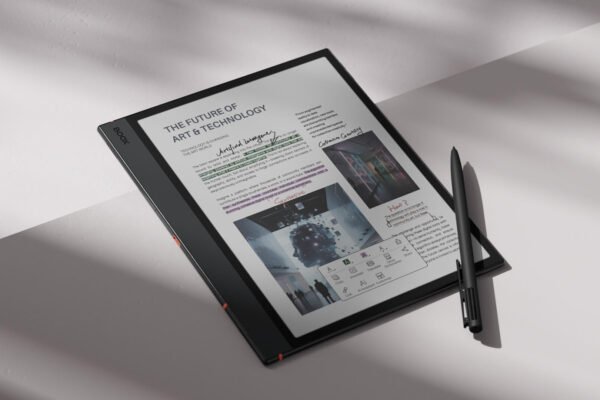
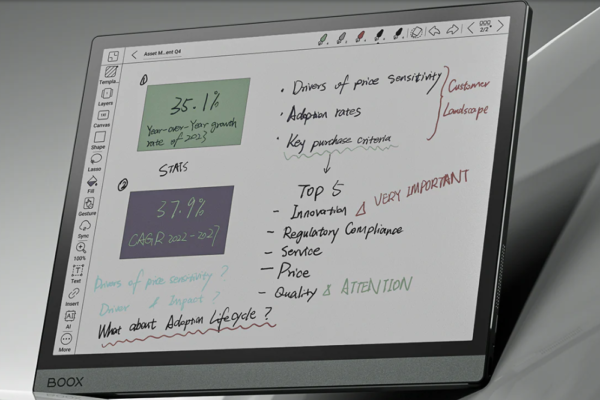
Color pens let you separate ideas, mark up PDFs and slides, and study from diagrams. This is where color often adds the most practical value, since your own annotations don’t need photographic accuracy.
Electronic Shelf Labels and Retail Displays
Spectra-based labels display prices and promotions and can be updated remotely. A red “sale” tag is a perfect use for a display that changes only a few times a day.
Public Information Displays and Digital Signage
Bus stops, transit maps, menus, and posters use larger color panels, including Spectra 6 and outdoor Kaleido 3 versions, because they use very little power and stay readable in sunlight.
Other Applications
Color E Ink has appeared in a handful of phones, starting with the Hisense A5C, as well as in wearables, color E Ink monitors, and industrial displays. Prism even appears on car concept exteriors. These are niche, but they show how far the technology now reaches.
Should You Buy a Color E Ink Device or Stick With Black and White?
Buy Color E Ink If You Regularly Read…
- Comics and graphic novels
- Illustrated textbooks and study guides
- Documents with color-coded information
- Maps, diagrams and charts
- PDFs you annotate in color
- Visual study materials, such as slides or lecture notes
Stick With Monochrome E Ink If You Mostly Read…
- Novels
- Long-form articles
- Text-heavy documents
- Academic papers where color isn’t essential
- Anything where the brightest, crispest page matters more than color
If most of your reading is black text on a light background, color gives you little and costs you some screen brightness.
What About the Price Difference?
Compare actual devices, not just “color vs no color.” Prices are shaped by screen size, stylus support, storage, front lighting, battery life, software, and refresh optimization. A 7-inch color e-reader and an 11-inch color note-taker live in completely different price brackets. Sometimes the color model is only modestly more expensive than its monochrome twin. Sometimes the gap is large.
Which Color E Ink Devices Are Worth Considering?
Affiliate disclosure: Einkopedia may earn a commission from qualifying purchases made through links on this page, at no extra cost to you. This doesn’t influence our recommendations.
If color illustrations and annotations are central to what you read, these are the current color E Ink devices worth comparing. For deeper advice, see our guide to the Best E Ink Tablets in 2026.
Each of these uses a verified color display, but they don’t all use the same generation. None of them use Kaleido 4 yet.
| Device | Screen size | Display technology | Best use | Main drawback | Check price |
|---|---|---|---|---|---|
| Kobo Clara Colour | 6 inches | Kaleido 3 | Compact color reading, library books | Small for comics | Check price on Amazon |
| Kobo Libra Colour | 7 inches | Kaleido 3 | Color reading with page-turn buttons, optional stylus | Stylus sold separately | Check price on Amazon |
| Kindle Colorsoft (2026) | 7 inches | Amazon custom Colorsoft display (color filter, oxide backplane) | Kindle Store readers who want color | Tied to Amazon’s ecosystem | Check price on Amazon |
| Boox Go Color 7 Gen II | 7 inches | Kaleido 3 | Android apps, physical page buttons | Software less polished, shorter battery life | Check price on Amazon |
| Boox Note Air5 C | 10.3 inches | Kaleido 3 | Color PDFs, notes and comics on a larger screen | Pricier; Android adds complexity | Check price on Amazon |
| Kindle Scribe Colorsoft | 11 inches | Amazon custom Colorsoft display (color filter) | Large-screen color reading and note-taking | Expensive; color at 150 PPI | Check price on Amazon |
| reMarkable Paper Pro | 11.8 inches | Canvas Color (based on Gallery 3) | Richest-looking color for handwritten notes | Not a full e-reader; slower color refresh | Check price on Amazon |
If you read lots of scanned documents, also see our guide to the best E Ink tablets for PDFs.
What Still Needs to Improve in Color E Ink?
Better Reflectance Without More Front Lighting
The ideal color screen would look bright in ordinary room light, just as a printed page does. Right now, most color E Ink screens look dim indoors unless you turn on the front light, and that uses extra battery. It also undercuts one of E Ink’s main selling points: a page you read by the light around you, like paper. E Ink says Kaleido 4 reflects 15% more light, which would help, but that claim hasn’t been independently tested yet.
Richer Colors Without Sacrificing Clarity
Filters cost brightness and resolution. Pigments cost speed. The next breakthrough needs more saturated color without halving color resolution or dimming the page.
Faster Refresh and Less Ghosting
Comics, scrolling web pages, and note-taking all reward speed. Ghosting, the faint remains of the previous image, is still more noticeable on some color screens. Our guide to what causes E Ink ghosting explains why.
Lower Prices and More Device Choices
Color panels and their supporting electronics cost more to make, and the market is still small. More competition and larger production volumes should help, but there’s no guarantee of fast price drops.
Will Color E Ink Ever Replace LCD or OLED?
Not in the foreseeable future, and it doesn’t need to. LCD and OLED will keep winning for video, games and photos. Color E Ink is getting better at what it was built for: reading, annotating, and showing information that doesn’t change constantly. Anything beyond that, such as smooth video on e-paper, remains speculative until real products prove it.
Common Myths About Color E Ink
Myth 1: Color E Ink is just a color LCD without a backlight. Reality: It’s an electrophoretic display that moves physical particles and holds its image without power.
Myth 2: All color E Ink uses the same technology. Reality: Kaleido uses a filter, Gallery and Spectra use colored pigments, and Prism is a color-changing film.
Myth 3: Color E Ink always has worse text resolution. Reality: Kaleido 3 shows black text at 300 PPI. Color images are lower resolution, and some Gallery-based tablets run lower overall.
Myth 4: Color E Ink cannot display video. Reality: Kaleido 3 already supports simple video and animation, and E Ink claims 18 FPS for Kaleido 4. It’s still no substitute for an LCD.
Myth 5: Color E Ink screens never need lighting. Reality: They need ambient light like paper, and most look much better indoors with a front light.
Myth 6: Newer generations always beat older devices in every way. Reality: Software, front lights, and controllers can matter as much as the panel.
Myth 7: Color E Ink is always better for the eyes. Reality: Many readers find it comfortable, but there’s no medical proof it prevents eye strain.
Frequently Asked Questions About Color E Ink
When Was Color E Ink First Introduced?
E Ink experimented with color in 2000 and 2001. Its first commercial color technology, Triton, was introduced in 2010. Mass-market color e-readers only arrived in 2020 with Kaleido.
What Is the Latest Color E Ink Technology in 2026?
Kaleido 4, announced in October 2026, is the newest. It belongs to the Kaleido color-filter family. Gallery and Spectra are separate families with different strengths.
Is Kaleido 4 Better Than Kaleido 3?
On paper, yes. E Ink claims double the gamut volume, 15% higher white reflectance and 50% more contrast. But only one device has been announced, and no independent testing is available yet.
Is Gallery 3 Better Than Kaleido?
It depends on your priorities. Gallery 3 offers richer color, while Kaleido is faster and better suited to quick page turns.
Why Does Color E Ink Look Less Vibrant Than an iPad?
An iPad emits its own light. Color E Ink only reflects light, and filters or pigments return less of it.
Does Color E Ink Use More Battery Than Black-and-White E Ink?
Often slightly, mainly because color screens rely more on the front light. Refresh activity, controllers and software also play a large role.
Can Color E Ink Display Videos?
Technically, yes, at low frame rates. In practice, motion looks choppy and colors are muted, so it’s fine for short clips but poor for movies.
Is Color E Ink Good for Comics and Manga?
It’s good for full-color comics, especially on larger screens. Most manga is black and white, so a monochrome reader is usually sharper and brighter for it.
Does Color E Ink Need a Front Light?
It works without one in bright light. Indoors, a front light makes a big difference to color.
Will Color E Ink Eventually Replace Monochrome E Ink?
Possibly in some product lines, but not soon. As long as color costs brightness and resolution, monochrome will remain the better choice for pure text reading.
Has Color E Ink Finally Come of Age?
Color E Ink has come a long way since Triton’s pale, expensive beginnings. Kaleido 3 made color e-readers mainstream, and Gallery 3 showed that richer color is possible. If its claims hold up, Kaleido 4 could narrow the gap further.
But this history isn’t a straight line toward one perfect screen. It’s a series of different engineering bets, each trading brightness, speed and color in its own way. Color E Ink is now genuinely practical for reading, education and productivity. Different technologies still serve different needs. And a newer, more colorful display isn’t automatically the best one for every reader.
If your reading depends on diagrams, illustrations and color-coded information, color E Ink may genuinely improve the experience. If you spend most of your time reading black text on a light background, a good monochrome E Ink screen may still be the smarter choice.