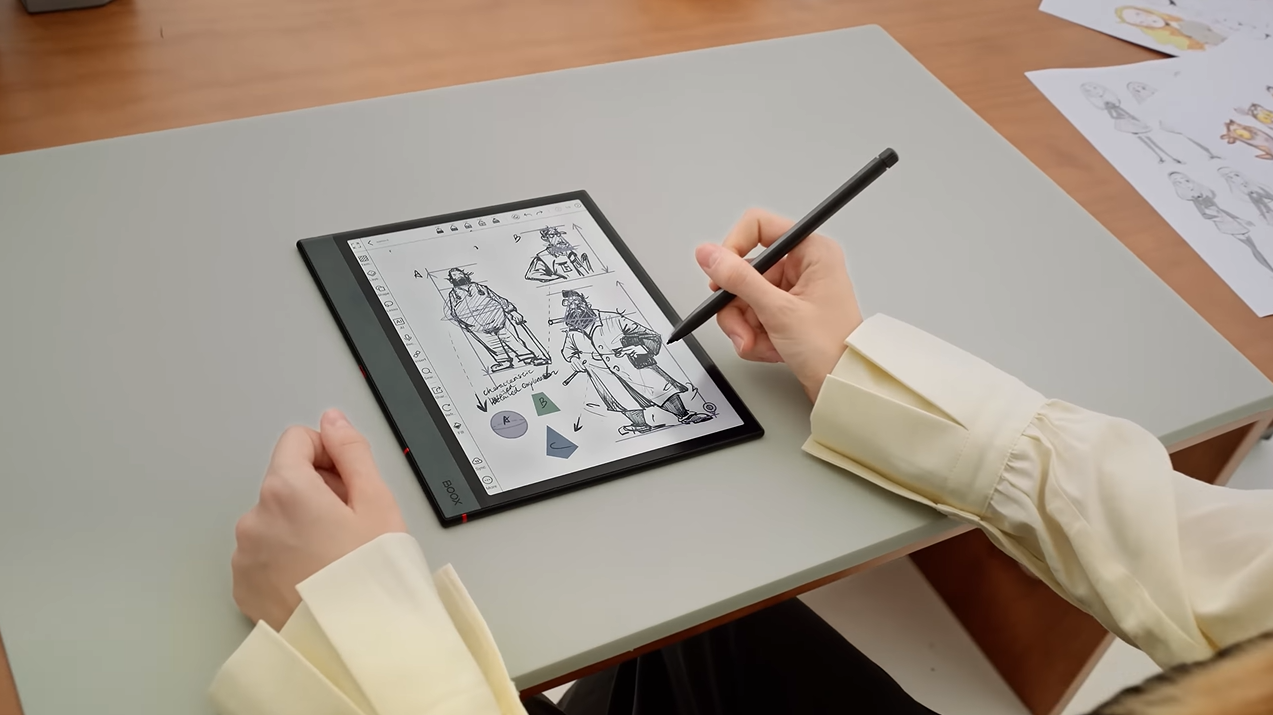
Between endless PDFs, lecture slides, and handwritten notes, students today are drowning in academic clutter. The right E Ink tablet can cut through that chaos—offering paper‑like display, eye‑friendly reading, and distraction‑free study sessions that no traditional tablet can match. But with so many options, how do you know which one truly fits your study routine? This guide breaks it down.
Disclosure: This article contains affiliate links. If you buy through these links, I may earn a small commission at no extra cost to you. This helps support Einkopedia and allows us to continue publishing honest, in-depth reviews and guides. Here is how it works
For students, E Ink tablets can be game-changing devices in their educational pursuits. The benefits are manifold: they offer long battery life, a glare-free display with a paper-like feel, minimal eye strain even during extended use, and excellent note-taking capabilities. Of course, these aren’t the only ways students stand to benefit from E Ink Tablets. Read on to discover more reasons why investing in one makes sense if you are a student.
The segment offers an impressive range of E Ink tablets across almost all sizes, shapes, and categories. Choosing the right device that perfectly fits your educational requirements can be quite a task. It isn’t always about specs or the looks of the device. Rather, it all depends on how well the device fits or contributes to the daily routine of the student.
The particular E Ink tablet should do a lot more than simply display text. It should also help the students to read, take notes, and stay organized. Besides, it should also offer a distraction-free environment that allows learning to flourish, with none of the distractions usually associated with conventional tablet devices. Read on to find out the key factors to keep in mind when choosing the best E Ink tablet for students.
1. Powerful Note-Taking That Goes Beyond Writing
This is one of the must-haves for a tablet meant for use by students. To be able to jot down notes while studying happens to be among the core requisites of any student-friendly E Ink tablet. However, note-taking experience can vary significantly from device to device. Here are some key features that a tablet must possess for it to be considered conducive to note-taking.
- Low-latency stylus input. This will ensure a more natural writing feel that is closer to real pen on paper.
- Handwriting to text conversion.
- Ability to search within handwritten notes.
- Easy organisation of notes with folders and tags.
Devices that offer an excellent note-taking experience that is closest to a real pen on paper include the reMarkable 2. This also offers the least distraction among almost all other E Ink tablets out there. Both of these qualities make it perfect for use by students who are seeking a pure paper-like and distraction-free writing feel.
Check Latest Price of reMarkable 2 on Amazon
2. Seamless PDF Reading and Annotation
Students and researchers often have to work with large volumes of text in PDF format. Those can range from textbooks to lecture slides or research papers. For an E Ink tablet to be truly useful in this context, it should be able to handle PDF files with ease. To be considered student-friendly, such a device should be able to perform the following:
- Open large PDF files quickly,
- Allow smooth scrolling and zoom in/out operations.
- Offer annotation features such as highlighting, underlining, and adding comments.
- Support split-screen mode for simultaneous reading and note-taking.
- The Onyx Boox Note Air 4 is one E Ink tablet that supports excellent PDF handling and multitasking.
3. Display Size – The Right Size for Effective Study
You need to have the right-sized display to be able to study effortlessly. Keep in mind the following points when choosing the perfect E Ink tablet for your studies.
- 7-8 inches: High on portability but too small for any serious academic work.
- 10.3 inches: Best suited for all-around studies. The preferred choice of most students.
- 13.3 inches: Will be best for those who have to read large A4-sized PDFs. A larger display means more room for note-taking and multitasking, but also one that is the least portable.
4. Eye Comfort to Support Long Study Sessions
One of the biggest reasons to opt for E Ink is its glare-free display, which makes it extremely comfortable for the eyes. It has the same look and feel as plain paper, and hence has almost zero strain on the eyes. Among the benefits of E Ink display technology are:
- No harsh backlight
- No blue light is emitted
- No glare even in bright-lit conditions.
All of this leads to markedly reduced eye strain, even when viewed for long.
Unlike traditional tablet devices with LCD panels, E Ink tablets are far more conducive to long hours of continuous study without wearing out your eyes.
5. Long Battery Life
Another huge positive of E Ink displays is their extremely frugal power requirements. This enables them to last days or even weeks on a single charge. This stands in sharp contrast to an LCD tablet that needs to be charged almost on a daily basis, depending on the usage. Among the direct benefits of the E Ink tablet, in terms of power efficiency, are:
- No daily charging anxiety
- Availability for long durations, which is a crucial factor during exams or while travelling.
- Consistent study sessions with zero or minimal interruptions.
6. Distraction-free learning environment
One underrated advantage of E Ink tablets is their ability to foster undiluted focus. This can be immensely beneficial for students struggling with digital distractions. In fact, this alone can boost productivity significantly. E Ink tablets allow for:
- Limited notifications
- Freedom from social media distractions
- Enhanced capacity for deep work.
7. Cloud Sync & Cross-Device Access
People today aren’t limited to using just one device, something that applies to students as well. However, it is important for the devices to be able to communicate among themselves to support seamless data transfer and information availability anytime, anywhere.
As such, an E Ink tablet to be beneficial to students must support the following:
- Google Drive, Dropbox, or OneDrive sync
- Ability to access notes from your phone, laptop, or any other device you might be using.
- Automatic backups.
This way, you can rest assured that your notes will be available to you at all times.
8. App Ecosystem: Flexibility vs Focus
It all depends on what the student’s specific requirements are. The advantage of E Ink tablets running Android is that there are scores of apps available that the students can make good use of. However, each app can also be a distraction if not properly managed.
The reMarkable 2 stands out for its strictly minimalist approach. It has zero app access and hence assures a completely distraction-free working environment.
The Onyx Boox Note Air 4C, on the other hand, is among the best E Ink tablets running Android and hence, promises unmatched flexibility.
Check Latest Price of reMarkable 2 on Amazon
Check Latest Price of Boox Note Air 4C on Amazon
9. Storage and File Management
Students usually have to deal with a large number of files, which can easily add up to several gigabytes of storage. Those include e-books, notes, other study materials, documents, and more. For an E Ink tablet to be truly useful, it must offer generous storage capacity. Look for qualities like:
- At least 32 GB of storage
- Support for multiple file formats (PDF, EPUB, DOCX)
- Easy file transfer via cloud storage or USB.
10. Stylus Quality – It Matters More Than You Might Have Thought
The stylus plays a crucial role in shaping the overall writing experience. Without the perfect stylus, writing feels less inviting and can negatively affectt the learning process, more so if you need to take notes frequently. Make sure the stylus has the following properties.
- Battery-free design (Wacom EMR preferred)
- Has replaceable nibs
- Offers excellent palm rejection
- Has a comfortable grip
Without a nice stylus, the entire tablet experience risks being compromised.
11. Lightweight & Durable Design
This is important as the device should be light enough for it to be carried around easily while being durable enough to survive the rigors associated with student life. Look for qualities like:
- Lightweight, so carrying it around does not become a chore.
- Durable, so that it survives long-term usage.
- Compatible with protective covers.
12. Price vs Long-Term Value
E Ink tablets don’t usually come cheap, but they can justify their price over the long term. The reason for this is that it alone can replace the following:
- Notebooks
- Printed materials
- Study books.
When used consistently, an E Ink tablet can become a long-term academic investment.
Conclusion
Choosing the best E Ink tablet for students is not about buying the most expensive device or the one with the longest feature list. It is about finding a tablet that fits naturally into your study routine and helps you learn better every day.
A truly student-friendly E Ink tablet should offer comfortable note-taking, smooth PDF reading and annotation, long battery life, eye-friendly viewing, and a distraction-free environment that supports focused learning. Features like cloud sync, good storage, the right display size, and a reliable stylus can further improve the overall experience and make studying much more efficient.
For some students, a minimalist device like the reMarkable 2 may be the perfect choice for pure writing and focus. For others, a more flexible Android-based option like the Onyx Boox Note Air 4C may be better suited for multitasking and app support. The right choice depends entirely on your personal study habits and academic needs.
Before making your decision, think carefully about how you plan to use the device—whether for reading textbooks, taking lecture notes, managing research papers, or preparing for exams. Once you understand your priorities, choosing the right E Ink tablet becomes much easier.