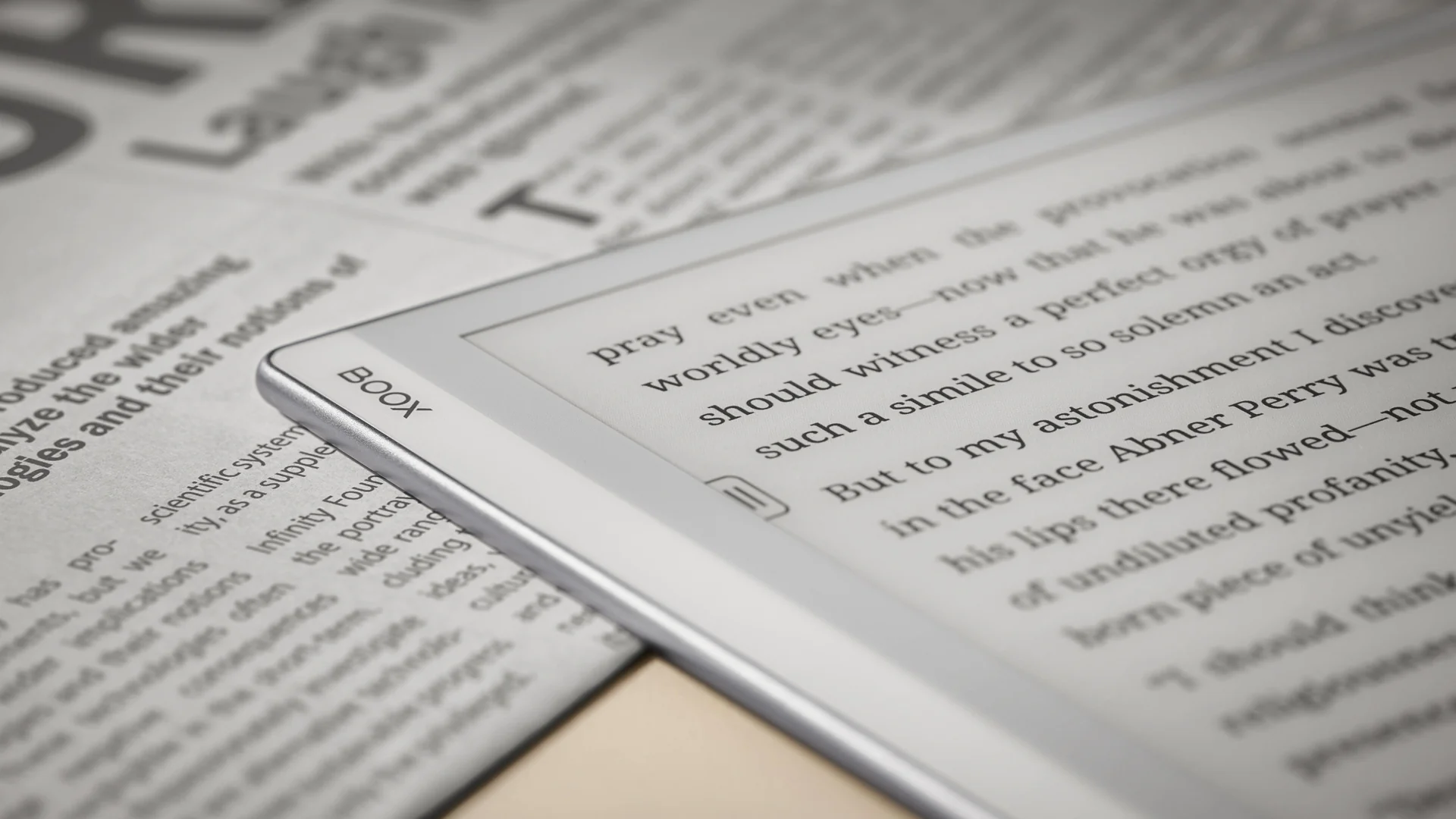
Have you ever wondered how a Kindle can display text for weeks without draining its battery? Or why the screen looks like a printed page instead of a glowing tablet?
The answer is electronic paper, better known as E Ink. Inside every E Ink screen are millions of microscopic capsules, each one smaller than the width of a human hair. Those capsules hold tiny particles that move around to form the letters and images readers see on the page.
This guide – How E Ink Displays Work: The Science Behind Electronic Paper – goes beyond the basics. It walks through exactly what happens inside an E Ink display, from the moment a page loads to the reason the screen briefly flashes black during a refresh. Readers will also learn why E Ink behaves nothing like an LCD or OLED screen, why color E Ink took so long to develop, and why this technology sips power instead of draining it.
What Makes E Ink Different From Ordinary Screens?
Most screens create their own light. E Ink does not.
A standard LCD screen uses a backlight. Small LEDs sit behind a layer of liquid crystals, and those crystals twist to block or allow light through. An OLED screen skips the backlight entirely and lights up each individual pixel on its own. Either way, the screen is acting like a small lamp pointed directly at the reader’s eyes.
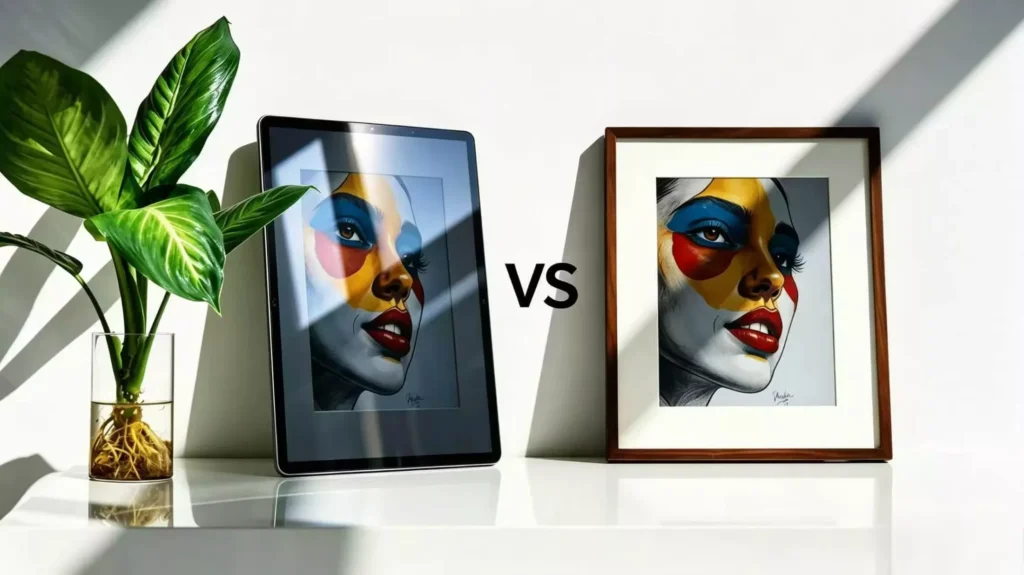
E Ink works the opposite way. It does not generate light at all. Instead, it reflects whatever light is already in the room, the same way a printed page does. This is why an E Ink screen looks better outdoors on a sunny day, while a phone or laptop screen tends to wash out and become hard to read.
This reflective quality is the main reason people compare E Ink to paper instead of a monitor. There is no backlight competing with sunlight, no light source beaming directly into the eyes, and no constant flicker from a refreshing image.
Here is how the major display types compare:
| Feature | E Ink | LCD | OLED | LED-Backlit LCD |
|---|---|---|---|---|
| Light source | Reflects ambient light | Backlight shines through crystals | Each pixel emits its own light | LED backlight shines through crystals |
| Power use when image is static | Almost none | Constant | Constant | Constant |
| Sunlight readability | Excellent | Poor to fair | Poor | Fair |
| Color range | Limited, improving | Excellent | Excellent | Excellent |
| Refresh speed | Slow | Fast | Very fast | Fast |
| Best for | Reading, low-power devices | General computing, TVs | Phones, premium TVs | Laptops, monitors, TVs |
The name “E Ink” is a nod to the technology’s goal. It was designed to look and behave as much like real, printed ink on paper as possible, not like a glowing screen.
The Basic Principle Behind E Ink: Electrophoresis
E Ink relies on a scientific process called electrophoresis. The word sounds complicated, but the idea behind it is simple.
Certain particles carry an electrical charge, similar to the static electricity a balloon picks up after being rubbed on a sweater. Charged particles react to an electric field. Positively charged particles move toward a negative charge, and negatively charged particles move toward a positive charge, the same way opposite ends of two magnets pull toward each other.
E Ink displays rely on two types of particles: one colored white and one colored black. Each carries an opposite electrical charge. When a small electric field is applied to the display, the particles carrying one charge move up, while the particles carrying the other charge move down. That single movement is the foundation of the entire technology. Grayscale, color, and even touch input all build on this same basic process.
The Tiny Building Blocks: Millions of Microcapsules
This is where the real magic happens. Every E Ink screen is built from millions of microcapsules, and a single display can contain hundreds of millions of them.
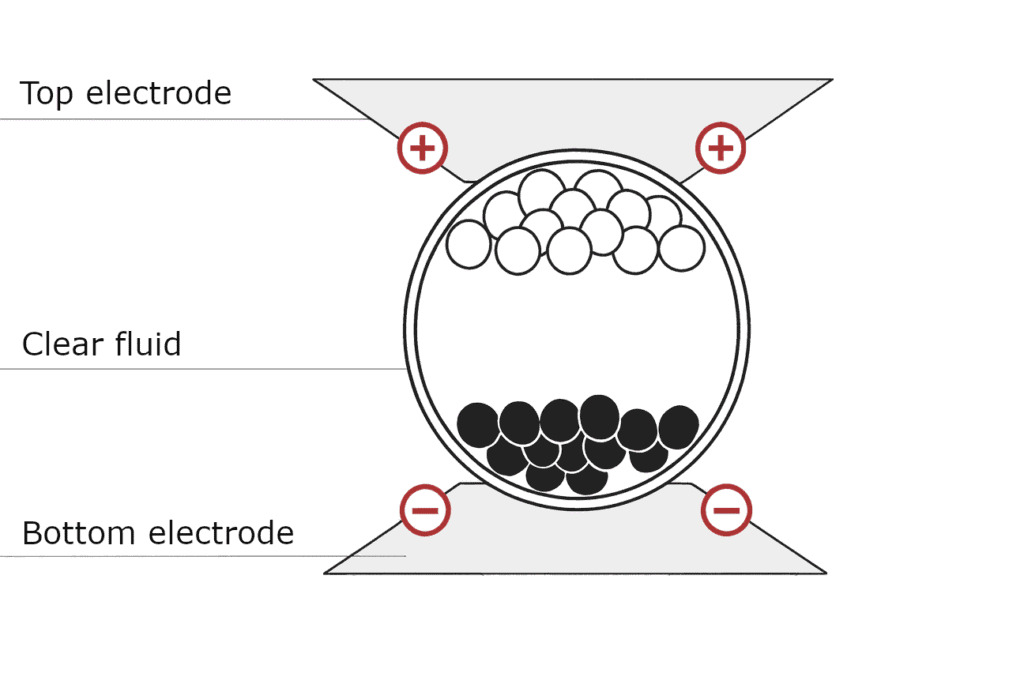
Each microcapsule is a tiny, sealed sphere. Inside every capsule are:
- White particles, carrying a positive charge
- Black particles, carrying a negative charge
- A clear liquid the particles float inside
The particles stay suspended in this clear liquid without ever mixing together, similar to the way oil and water separate no matter how much they get stirred. Because each capsule is sealed shut, particles cannot leak out or drift into a neighboring capsule. This sealing is what allows an E Ink screen to hold an image for years without any noticeable fading.
Manufacturers apply a thin layer of these microcapsules onto a sheet of plastic film. That film is then laminated onto a layer of electronics called a backplane. The backplane is the part that applies an electric charge to each section of the display individually, which is how different areas can show different things at the same time.
Each microcapsule, or a small cluster of them, forms part of a single pixel. Millions of these tiny capsules working together are what create entire pages of text, illustrations, and photos. Some modern displays use a related design called microcups instead of capsules, which are tiny open wells sealed with a top film rather than individual spheres, but the underlying principle is the same.
How a Single Pixel Changes Color
Understanding one pixel is the key to understanding the entire screen. Here is what happens, step by step, when a pixel needs to turn white:
- Voltage is applied to the electrodes above and below the microcapsule
- An electric field forms inside the capsule
- The charged particles respond to that field
- White particles rise to the top of the capsule
- Black particles sink to the bottom
- The pixel now appears white to the reader
Reversing the voltage reverses the entire process. The black particles rise to the top instead, the white particles sink out of view, and the pixel appears black. Every letter, number, and shape on an E Ink screen is built from millions of these tiny up-and-down movements happening at once.
How Millions of Pixels Form Text and Images
A single pixel can only be one shade at a time, so a display needs a grid of many pixels working together, known as a pixel matrix. Each pixel is assigned its own tiny section of the backplane, and the controller decides which ones need to turn white, black, or somewhere in between.
To render a letter, the controller darkens only the pixels that make up the shape of that letter and leaves the rest white. Stack thousands of letters together, and a full page of text appears. The same process applies to illustrations, manga panels, PDFs, and even handwriting, which is really just a very fine, irregular pattern of darkened pixels following the path of the pen.
Because E Ink pixels can hold their state without requiring a continuous source of power, an entire page of text can sit on the screen indefinitely once it has been drawn. This is very different from a phone or monitor, where the whole image is redrawn dozens of times every second.
How Grayscale Works
E Ink is not simply black and white. Modern E Ink displays can show up to 16 shades of gray, which is what gives Kindle text its smooth, print-like appearance.
Grayscale is possible because particles do not have to move all the way to the top or bottom of a capsule. By applying a lower voltage for a shorter amount of time, the display controller can stop the particles somewhere in the middle. A pixel that is roughly half black and half white particles appears as medium gray to the eye.
This partial movement is also behind anti-aliasing, the technique used to smooth out the edges of letters. Without grayscale, text edges would look jagged, similar to old dot-matrix printing. With multiple shades of gray available, the edges of each letter can be softened, which is a major reason modern Kindles and e-readers display such crisp, book-quality typography.
How Touch Input Works Without Affecting the Display
Touchscreens and E Ink might seem like an odd pairing, since the particles inside each capsule move fairly slowly. In practice, touch input on an E Ink device is handled by a completely separate layer that sits on top of the display and does not interfere with the particles underneath.
Most E Ink e-readers use a capacitive touch layer, the same basic technology found on smartphones. It detects the small electrical charge in a human finger and translates that into an on-screen tap or swipe.
Devices built for handwriting, such as note-taking tablets, typically add a digitizer layer as well. For years, the industry standard was Wacom EMR (electromagnetic resonance), a technology that powers a pen wirelessly through a magnetic field generated beneath the screen, so the stylus never needs a battery. More recently, some devices, including the reMarkable Paper Pro, have moved to Active Pen technology instead, which uses standards like USI to communicate directly with the display. Either approach can track pressure and tilt with high precision.
Because these layers sit above the display rather than inside it, writing on an E Ink tablet feels close to writing on paper, though there is a small, deliberate delay between the pen tip and the appearance of ink, since the underlying particles still need a moment to move.
Why E Ink Uses Almost No Power
This is one of the most important things to understand about E Ink, and it comes down to a property called bistability.
Once particles inside a microcapsule move into position, they stay there. There is no further charge needed to make the particles to hold on to their respective positions. In other words, no ongoing electricity is required to hold an image in place. Power is only needed at the exact moment the image changes. This is very different from LCD and OLED screens that constantly redraw the picture many times per second, irrespective of whether anything on screen has changed or not.
Consider the difference between reading an e-book and scrolling through Instagram. Reading a Kindle page draws power for a fraction of a second while the page turns, then draws essentially nothing while the reader’s eyes move across the static text. Scrolling social media on a phone keeps the backlight running continuously and redraws the entire screen dozens of times per second, even during the brief pauses between swipes.
This difference adds up quickly. A phone screen might need to be recharged daily, while a Kindle used for an hour a day can often last several weeks on a single charge. The battery is not doing much more work than it takes to occasionally flip a page.
What Happens During a Screen Refresh?
This is one of the most common questions people ask about E Ink, and it has a simple explanation rooted in how the particles behave.
Every time a page changes, leftover particles from the previous image can remain slightly out of place. Over several page turns, this buildup can create ghosting, which is a faint, shadowy outline of previous text or images bleeding through the current page. Ghosting happens because a full reset of every capsule is not performed on every single page turn, only a partial update of the pixels that actually need to change.
To clear this residue, E Ink displays periodically perform a full refresh. During a full refresh, the screen flashes to solid black, then to solid white, sometimes cycling through this a couple of times before the new page appears. That black flash pushes every particle in every capsule to a known starting position, wiping out any leftover ghosting before drawing the new image from a clean slate.
Some devices flash less often than others because of software improvements. E Ink’s Regal waveform technology, used across most mainstream e-readers, dramatically reduces how often a full refresh is needed by intelligently tracking which pixels actually changed between pages. As a result, a Kindle using Regal can flip through more than a hundred pages before a full black flash appears, rather than flashing on every single page turn.
Fast Refresh Modes
Standard E Ink refreshes are built for reading, not scrolling or tapping through menus quickly. To make devices feel more responsive, manufacturers have developed several faster refresh modes.
- A2 mode skips much of the fine-grained grayscale processing and jumps pixels straight to black or white, trading image quality for speed
- Regal reduces the need for full refreshes during normal reading, keeping pages sharp while cutting down on flashing
- X Mode, used by Onyx Boox, and similar modes from other brands push refresh speed even further for scrolling and light animation
- Boox Super Refresh (BSR) and Bigme’s xRapid pair a dedicated processor with software tricks to reach smoother, near-video frame rates on select tablets and monitors
The trade-off is consistent across all of these modes: faster refreshes mean reduced grayscale accuracy, more visible ghosting, and lower image quality. A device set to a fast mode for scrolling will not look nearly as crisp as one set to its slowest, highest-quality mode for reading a detailed page or PDF.
Why Video Is Difficult on E Ink
Video requires a screen to redraw its entire image dozens of times per second. E Ink particles were never designed to move that quickly, so video remains one of the technology’s toughest challenges.
Several factors work against smooth video on E Ink. Particle movement itself takes measurable time, especially compared to the near-instant response of an LCD or OLED pixel. There is also inherent latency in how the display controller processes each frame, plus the physical limits of how fast grayscale transitions can occur without leaving visible ghosting behind.
Despite these limits, progress has been real. Devices like Dasung’s Paperlike monitors, BOOX tablets and monitors, and Bigme’s larger color displays have pushed refresh rates well beyond what was possible a few years ago, with some new color E Ink monitors now advertising refresh rates in the 30 to 60 hertz range for everyday desktop use. These improvements come from newer, more powerful display controllers paired with dedicated processing hardware, rather than any fundamental change to how the particles themselves move. Video on E Ink still looks noticeably different from an LCD, with more visible artifacts and softer motion, but the gap continues to close.
How Color E Ink Works
Adding color to E Ink is far more difficult than it sounds, because the underlying particles were originally designed to do only one thing well: move between black and white. Several different approaches now exist, each with its own strengths and trade-offs.
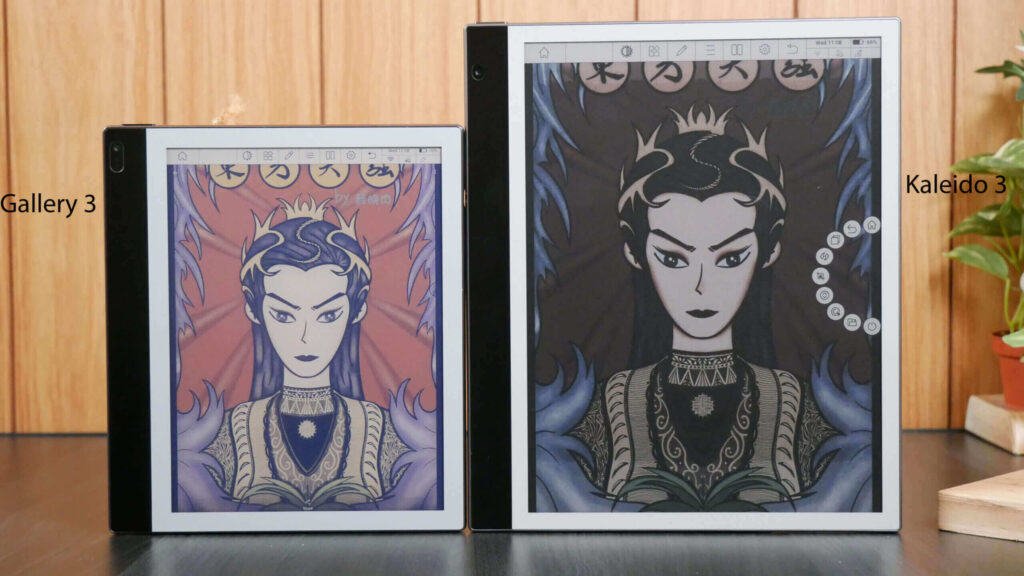
Kaleido
Kaleido places a color filter array, a thin grid of red, green, and blue filters, directly on top of a standard black-and-white E Ink panel. Light passes through the colored filters on its way back to the reader’s eye, which produces the color effect. The trade-off is resolution and brightness: the black-and-white layer underneath can reach 300 pixels per inch, but the color filter layer cuts that down to around 150 pixels per inch, and filtering light this way makes colors look softer and less saturated than an LCD screen. The latest version, Kaleido 3, improved color saturation and moved the filter layer physically closer to the ink, which helped brighten the palette.
Gallery 3 (ACeP)
Gallery 3 takes a completely different approach, known as Advanced Color ePaper, or ACeP. Instead of filtering light through a separate layer, each microcapsule contains four colored particles: cyan, magenta, yellow, and white. By carefully positioning these particles, a single capsule can produce a full range of colors without needing any filter array at all. This produces richer, more saturated color than Kaleido. The downside is speed: coordinating four ink particle types instead of two is far more complex, so color refreshes on Gallery 3 take noticeably longer, ranging from about half a second up to even a couple of seconds depending on how much color accuracy is needed.
Spectra
Spectra is designed for a completely different purpose: electronic shelf labels and retail signage. It typically uses a smaller set of pigments, such as black, white, red, and yellow, or an expanded six-color version, to display prices, promotions, and simple graphics. Spectra displays are optimized for extremely low power use and long battery life on small, battery-powered tags rather than for rich photographic color, which is why they remain the standard choice across grocery stores and retail shelves.
Prism
Prism is not really a screen at all. It is a color-changing film built for architecture, automotive interiors, and product design. Using the same bistable ink technology as other E Ink products, Prism can shift an entire wall, panel, or surface to a new solid color at the flip of a switch, and the color holds in place without drawing any power afterward. It has been used in concept car interiors and design installations where a surface needs to change color or pattern on demand.
The Controller: The Hidden Brain Behind Every E Ink Display
The particles and capsules only tell half the story. Every E Ink screen also relies on a display controller, a small chip that manages exactly how and when voltage gets applied across the panel.
The controller’s instructions come from something called a waveform, which is essentially a precise recipe for how voltage should rise, fall, and hold over time to move particles into position without leaving ghosting behind. Waveforms are closely guarded by manufacturers and tuned differently for each screen size, panel generation, and use case.
Controllers also handle temperature compensation, adjusting waveforms automatically based on the current operating temperature, and they decide which refresh mode to use for a given task, whether that is a full-quality page turn or a fast, lower-quality scroll. This is also why firmware updates can visibly improve an E Ink device over time. Even with identical hardware, better waveform software can reduce ghosting, speed up page turns, and improve grayscale accuracy.
Why Temperature Affects E Ink
Temperature has a direct effect on how E Ink particles move, since electrophoresis relies on particles traveling through a liquid.
In cold weather, that liquid thickens slightly, similar to how honey moves slower in the refrigerator than at room temperature. This slows particle movement, which is why E Ink devices sometimes feel sluggish or need longer refresh times outdoors in winter. In hot weather, the opposite tends to happen: particles move more freely, though extreme heat can eventually affect image quality and, in rare cases, damage the display.
To manage this, most E Ink controllers include automatic temperature compensation. A built-in sensor measures the current temperature and selects a waveform that has been tuned for those conditions, keeping refresh quality as consistent as possible, irrespecive of whether a device is being used in a warm living room or a cold car.
Why E Ink Looks Like Real Paper
Several design choices combine to give E Ink its paper-like appearance, and light is at the center of nearly all of them.
Because E Ink is a reflective display, it depends on ambient light the same way a printed book does, rather than emitting light directly at the reader. Most E Ink screens also have a matte, slightly textured surface, which scatters light in a way that reduces glare compared to the glossy glass on a phone or tablet.
Many modern e-readers add a front light, a thin layer of LEDs along the edge of the screen that shines light down onto the display rather than through it. This is a subtle but important distinction from a backlight. A front light illuminates the reflective surface for reading in the dark, without turning the E Ink panel into a light-emitting screen itself. Combined with the reduced glare and total absence of a bright light source between the screen and the eyes, this is why E Ink remains comfortably readable outdoors in direct sunlight, a situation where phone and laptop screens usually struggle.
Common Misconceptions
A few myths about E Ink persist even among longtime e-reader owners. Here are some of the most common ones, cleared up:
“E Ink is just black and white.” This was true in the earliest generations of the technology, but color E Ink has existed for years now, through Kaleido, Gallery 3, and other approaches, even though color quality is still catching up to LCD and OLED.
“E Ink doesn’t need electricity.” E Ink does need electricity, just not continuously. Power is required to change the image, but almost none is needed to hold that image in place once it is set.
“E Ink can never display video.” Video on E Ink is genuinely difficult, but it is no longer impossible. Modern fast-refresh monitors and tablets can play video, even if the quality does not match an LCD or OLED screen.
“E Ink is identical to LCD.” The two technologies could not be more different. LCD emits light through a backlight and refreshes constantly. E Ink reflects ambient light and only refreshes when the image actually changes.
“E Ink is simply another name for e-readers.” E Ink is the display technology, while an e-reader is just one type of device that uses it. E Ink also appears in note-taking tablets, retail shelf labels, digital signage, smartwatches, and more.
Advantages of the Technology
- Eye comfort: No backlight flicker and no direct light source pointed at the eyes make long reading sessions less tiring
- Battery life: Bistability means power is only needed when the page actually changes, allowing devices to last weeks on a single charge
- Sunlight readability: A reflective surface actually looks better in bright light, which is the opposite of most screens
- Always-on displays: Because a static image costs no power, E Ink can stay visible permanently, which is ideal for shelf labels and signage
- Sustainability: Extremely low power requirements along with long device lifespan reduce both energy usage and electronic waste over time
- Readability: High-resolution grayscale and sharp, print-like text make E Ink especially well- suited for long-form reading
Current Limitations
- Refresh speed: Particle movement is inherently slower than an emissive pixel lighting up, limiting fast motion and video
- Color quality: Even the best current color E Ink cannot match the saturation and brightness of LCD or OLED screens
- Manufacturing costs: Color panels, larger sizes, and flexible formats remain more expensive to produce than standard black-and-white panels
- Limited animations: Smooth, LCD-quality animation is still difficult without noticeably sacrificing image quality
- Temperature dependence: Very cold or very hot conditions can slow refresh speed or affect long-term reliability
- Availability: Certain sizes, color panels, and specialty formats remain harder to find outside of niche and specialty devices
Where E Ink Is Used Today
E Ink has expanded well beyond the e-reader category it first became known for. It now shows up in a wide range of devices, which includes:
- E-readers, including Kindles, Kobo devices, and PocketBook models
- Note-taking tablets, including BOOX and reMarkable devices
- Digital notebooks used for handwriting and sketching
- Electronic shelf labels in grocery and retail stores
- Digital signage in malls, airports, and transit stations
- Public transportation displays showing schedules and route information
- Industrial equipment and control panel readouts
- E-ink smartphones designed for distraction-free use
- Computer monitors, including large color models from Dasung, BOOX, and Bigme
- Laptops with secondary E Ink screens or keyboards
- Automotive dashboards and interior surfaces
- Wearables, including certain smartwatch models
- Medical equipment displays
- IoT devices and sensors that need to run for long periods without recharging
The Future of E Ink
E Ink development has accelerated in recent years, and several trends point toward where the technology is headed next.
Refresh rates continue to climb, with newer color monitors now advertising speeds in the 30 to 60 hertz range. This marks a dramatic jump from the multi-second refreshes color E Ink needed just a few years ago. Color reproduction keeps improving as well, as manufacturers refine both filter-based approaches like Kaleido and particle-based approaches like Gallery 3.
Larger displays, foldable panels, and rollable electronic paper are also moving from concept demonstrations toward real products, opening the door to bigger signage and more flexible device designs. At the same time, manufacturing costs are gradually coming down as production scales up, particularly for electronic shelf labels, which have become one of the fastest-growing categories for the technology.
Beyond reading devices, interactive signage, education tools, healthcare displays, and AI-assisted note-taking are all emerging as major growth areas. As refresh speeds improve and color quality closes the gap with traditional screens, E Ink is positioned to keep expanding into places where a glowing screen never made sense.
Frequently Asked Questions
How do E Ink displays work?
E Ink displays use millions of microscopic capsules filled with charged black and white particles. An electric field moves those particles up or down inside each capsule to form text and images, and the particles stay in place without needing continuous power.
Why does E Ink only use power when changing pages?
This is due to a property called bistability. Once particles settle into position inside a capsule, they stay there on their own. Electricity is only needed to move the particles into a new position, not to hold them still.
Why does the screen flash black during a refresh?
The black flash pushes every particle in every capsule to a known starting position. This clears out ghosting and leftover residue from previous pages before the new image is drawn from a clean slate.
Can E Ink display color?
Yes. Technologies like Kaleido use a color filter layer, while Gallery 3 uses four colored particles inside each capsule instead of just black and white. Color E Ink still lags behind LCD and OLED in brightness and saturation.
Why is E Ink easier on the eyes?
E Ink reflects ambient light instead of emitting its own, similar to a printed page. There is no backlight flicker and no bright light source pointed directly at the reader, which many people find more comfortable for long reading sessions.
Does E Ink emit blue light?
E Ink itself does not emit any light, including blue light. However, many E Ink devices include a front light for reading in the dark, and that front light can emit some blue light, though usually at a lower level than a phone or tablet backlight.
Why can’t E Ink play smooth video?
Video requires very fast, repeated pixel changes, and E Ink particles physically take longer to move than an emissive LCD or OLED pixel. Newer fast-refresh monitors have narrowed this gap significantly, but it has not fully closed.
What is ghosting on an E Ink display?
Ghosting is a faint, shadowy outline of previous content that remains visible after the page changes. It happens because partial refreshes only update the pixels that need to change, allowing tiny amounts of particle residue to build up over several page turns.
Can E Ink displays wear out?
E Ink panels are generally very durable and can hold images for years without noticeable degradation. Like any electronic component, extreme heat, physical damage, or years of heavy use can eventually affect performance.
Why do E Ink screens look like paper?
A matte, textured surface reduces glare, the display reflects ambient light instead of emitting it, and grayscale rendering produces smooth, print-like text. Together, these design choices closely mimic the look of ink on a printed page.
What is electrophoresis in E Ink?
Electrophoresis is the movement of electrically charged particles in response to an electric field. It is the core scientific process that allows E Ink’s black and white particles to move up or down inside each microcapsule.
How do E Ink tablets detect pen input?
Most note-taking tablets use either a Wacom EMR digitizer, which powers a battery-free stylus through a magnetic field, or newer Active Pen technology, such as USI, which communicates directly with the display. Both sit on a layer separate from the ink particles themselves.
What is the difference between Kaleido and Gallery 3?
Kaleido places a color filter over a standard black-and-white panel, which is faster but produces softer, less saturated colors. Gallery 3 uses four colored particles inside each capsule, producing richer color at the cost of a slower refresh.
Why do E Ink displays work better in sunlight?
Because E Ink reflects ambient light rather than emitting its own, more available light actually makes the screen easier to read. LCD and OLED screens rely on emitted light that has to compete with sunlight, which is why they often have that wash-out effect when outdoors.
Can E Ink displays function in freezing temperatures?
Yes, though performance slows down. Cold temperatures thicken the liquid inside each capsule, which slows particle movement and can extend refresh times. Most devices include automatic temperature compensation to adjust for this.
Does color E Ink use more battery than black-and-white E Ink?
Color refreshes generally take longer and involve moving more particle types, which can use somewhat more power per page change. However, color E Ink devices still use vastly less power than LCD or OLED screens because the same bistability rules still apply.
Why are some E Ink monitors faster than others?
Refresh speed depends on the display controller, the waveform software behind it, and any dedicated processing hardware added by the manufacturer. Technologies like Boox Super Refresh and Bigme’s xRapid pair extra hardware with software optimizations to reach faster frame rates.
Is E Ink bad for gaming or fast-motion content?
E Ink is not well-suited to fast-motion content in general. Even with fast refresh modes, image quality drops noticeably during quick motion, and it will not match the smoothness of a traditional gaming monitor.
Conclusion
Electronic paper may look simple on the surface, but every page turn is the result of millions of microscopic charged particles moving with remarkable precision. From electrophoresis and microcapsules to display controllers and waveforms, E Ink combines materials science, electronics, and software engineering to create a reading experience that remains unlike any other display technology.
Its ability to hold an image without continuous power, remain perfectly readable in bright sunlight, and closely mimic the appearance of printed paper is what has made E Ink the foundation of modern e-readers, digital notebooks, electronic shelf labels, and an increasing number of innovative devices. While it still cannot match LCD or OLED displays for vibrant color or fast-moving video, each new generation continues to narrow those gaps through improvements in refresh speed, color reproduction, and display design.
Understanding how E Ink works also helps explain why these devices behave the way they do—from the occasional black screen refresh to their exceptional battery life and paper-like readability. What might seem like limitations at first are often deliberate engineering trade-offs that allow E Ink to excel at what it was designed for: presenting information comfortably and efficiently for extended periods.
As the technology continues to evolve, with faster color displays, flexible electronic paper, and entirely new applications emerging every year, E Ink is steadily expanding far beyond e-readers. Whether you’re reading a novel on a Kindle, taking notes on a digital notebook, browsing prices on an electronic shelf label, or using an E Ink monitor for distraction-free work, you’re seeing the same elegant scientific principle in action—millions of tiny particles working together to make digital content feel remarkably close to ink on paper.