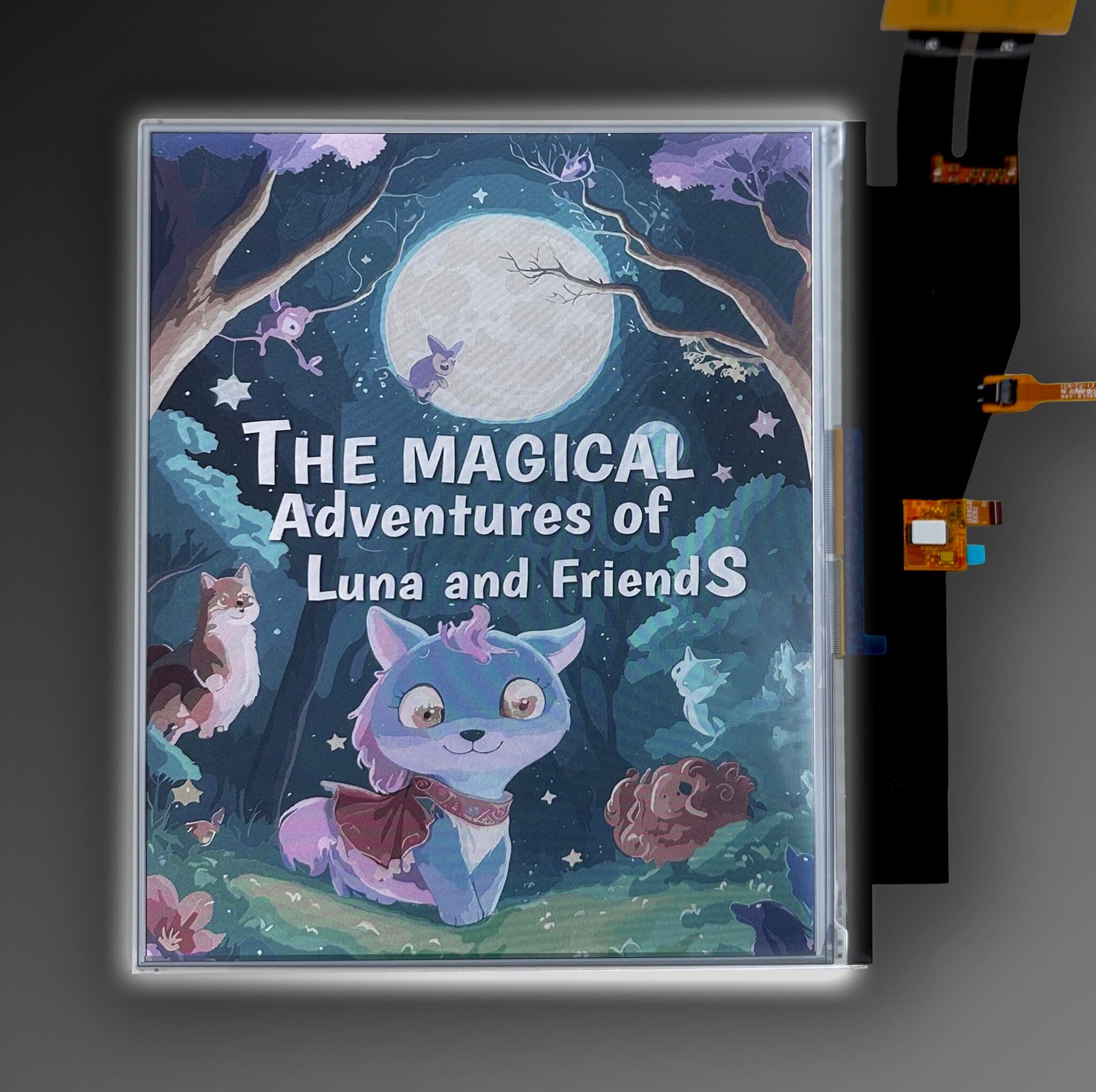
You’re reading a novel on a color E Ink tablet in the living room. A lamp is on across the room, and the light from the window is fading. The page is almost all text. The occasional map or illustration is why you chose color, but most of the time, what matters is how the words look.
That’s where color E Ink still shows its compromise. Under ordinary indoor light, many color screens look grayer than a monochrome e-reader, and the usual fix is to turn on the front light.
E Ink’s Kaleido 4, announced on October 15, 2026, promises brighter whites and stronger contrast than the previous generation. That raises a practical question: could a Kaleido 4 device be comfortable to read with less light, or none at all?
The claims make that a credible possibility. But panel specifications alone can’t settle it. That will take finished devices, compared side by side.
Why color E Ink can look darker before the light comes on
The color filter adds a trade-off
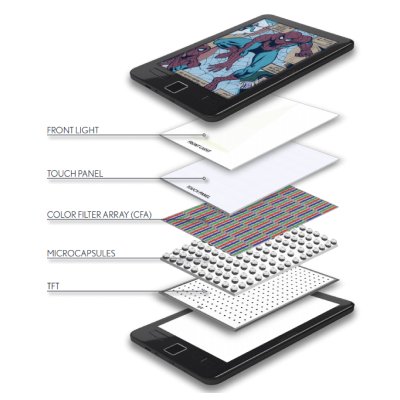
Kaleido doesn’t use colored ink. It places a color filter, a fine grid of red, green, and blue segments, over a black-and-white electrophoretic layer similar to the one in monochrome E Ink. Color comes from which segments sit over light or dark areas.
The filter also absorbs some of the light passing through it. That shows up in several ways that are easy to lump together but worth keeping apart:
- Background tone: white areas can look grayer.
- Text contrast: how sharply black letters stand out from the page.
- Fine detail: Kaleido 3 renders color at half the resolution of black and white, 150 ppi versus 300 ppi.
- Grain: the filter pattern can be visible up close.
A new panel can improve one of these without fixing the others.
Front lighting helps, but changes the comparison
E Ink is reflective. It forms the image from light already in the room. An integrated front light adds light across the screen surface from its edges.
Turning it on can make a color screen look much brighter. But a brighter screen with the light on doesn’t prove better reflectance with the light off. It shows what the light adds, not what the panel does alone.
Preferences vary, too. Room lighting, text size, eyesight, and the finished device all shape what feels comfortable. For background on the technology, see our explainer on how E Ink displays work.
What Kaleido 4 actually changes
E Ink’s announcement compares Kaleido 4 with “the previous generation.” Its claims, and what each could mean in practice:
| Announced improvement | Potential relevance to ordinary reading |
|---|---|
| 15% higher white reflectance | A lighter-looking white state under comparable lighting |
| 50% better contrast | Greater distinction between dark and light content |
| Doubled color-gamut volume, to more than 40K | Broader color reproduction; a separate issue from unlit text readability |
| New oxide TFT backplane and algorithms | Higher driving voltages and faster refresh; video up to 18fps |
These are E Ink’s figures, not independent measurements. Two limits matter.
First, a 15% improvement is relative. It isn’t a 15-percentage-point jump. If a panel reflected 30% of incoming light, a 15% gain would bring it to about 34.5%, not 45%. E Ink hasn’t published absolute reflectance values for Kaleido 4, so that example is purely illustrative.
Second, “50% better contrast” doesn’t show how Kaleido 4 compares with any particular monochrome screen. That would need absolute contrast figures for both, measured the same way.
The “40K” figure describes color-gamut volume, a measure of the range of colors a display can reproduce. It isn’t a count of 40,000 displayable colors. E Ink also hasn’t published Kaleido 4’s resolution.
One more detail is easy to miss. The announcement mentions a redesigned front-light system that delivers “clearer, more natural color reproduction,” but it appears in the section on Hanvon’s device. It’s not clear whether that’s part of the panel platform or Hanvon’s implementation.
Could those changes reduce the need for front lighting?
Possibly. If a finished screen reflects more of the room’s light while keeping text crisp, some readers may find it comfortable without extra illumination in places where Kaleido 3 needed the light on.
That’s two separate outcomes, though:
- Reading with the front light off in conditions where earlier color screens felt too dim.
- Reading with the light turned lower to reach the same comfort level.
The announcement guarantees neither.
The panel is only one layer of what you see. Touch layers, protective glass, anti-glare surface treatments, the front-light design, font rendering, and refresh settings all affect the final page. Hanvon’s M10C II, for example, uses a micro-etched tempered-glass surface. Two devices with the same Kaleido 4 panel could look noticeably different.
So treat this as an engineering expectation worth investigating, not a tested conclusion. Kaleido 4 products won’t all perform alike.
The comparisons that will tell buyers more than promotional photos
No independent, controlled comparison of Kaleido 4 has been published yet. When reviews arrive, these are the tests worth looking for:
| Test | What a useful comparison should show |
|---|---|
| Front light off, same indoor lighting | Whether backgrounds and text are easier to distinguish |
| Ordinary daylight away from direct sun | Performance in a realistic reading position |
| Small text, footnotes, and chart labels | Fine-detail readability, not just attractive cover images |
| Comparable perceived brightness with lights on | Whether the newer device needs less added illumination |
| Scrolling followed by a clean refresh | Ghosting and detail retention, separate from stationary reading |
| Matched photographs | Fixed exposure, white balance, angle, and comparable content |
Watch for one common shortcut. Matching brightness sliders isn’t a controlled comparison. Setting two devices to 30% doesn’t mean they’re putting out the same amount of light; each manufacturer scales its slider differently. A fair test matches what the reader actually sees, ideally with a light meter.
Photos deserve caution, too. They’re useful supporting evidence, but automatic exposure and phone processing can hide real differences or exaggerate small ones. Side-by-side shots taken with fixed camera settings are far more telling than press images.
Why Hanvon’s first implementation doesn’t answer every question
E Ink names the Hanvon M10C II as the first device with Kaleido 4. For now it’s the only confirmed one, and it’s sold only in China.
E Ink credits the device’s 27% faster page turning and scrolling to a combination of the new backplane, Hanvon’s own “Enhanced Pressure Floating” technology, and its T2000 timing controller. It doesn’t say what the 27% is measured against. That figure belongs to this one device and shouldn’t be assumed for future Kaleido 4 products.
The same goes for the up-to-18fps video capability. Smoother motion says nothing about how text looks unlit, how much ghosting remains, or how much power the screen uses.
What this means for battery life and buying decisions
Less lighting could help, but battery gains remain unproven
If a Kaleido 4 device lets you read with the front light lower or off, the light itself would use less energy. That much follows logically.
It doesn’t translate into a predictable number of extra days or weeks. Battery life also depends on the processor, Wi-Fi and Bluetooth use, how often the screen refreshes, background apps on Android tablets, and how the manufacturer tunes the device. Until finished devices are measured, any battery claim tied to Kaleido 4’s optics would be a guess.
Who should watch Kaleido 4 closely?
- Readers who mostly read novels but want occasional color stand to gain the most if unlit text really improves, because plain-text readability is their main concern.
- People reading illustrated nonfiction, charts, or annotated PDFs should also watch the color-gamut and fine-detail results, not just brightness.
- Current color-device owners who are happy with their screens have no reason to replace them based on an announcement.
- Buyers who need a device now should choose from what’s available rather than wait. A panel announcement doesn’t establish pricing, US availability, or which brands will adopt it.
If you’re shopping today, our guides to the best E Ink tablets for reading and the best E Ink tablets for reading PDFs cover current options. Existing Kaleido 3 devices don’t become obsolete because a successor panel has been announced.
The answer is promising, but still needs a finished-device comparison
Can Kaleido 4 make color E Ink better without turning up the light? E Ink’s claimed gains in white reflectance and contrast make that plausible, and worth watching. They don’t yet prove that front lighting becomes unnecessary, or that a color screen now matches a monochrome one.
The comparison that will settle it is simple: the same page, under the same room lighting, with both front lights switched off.