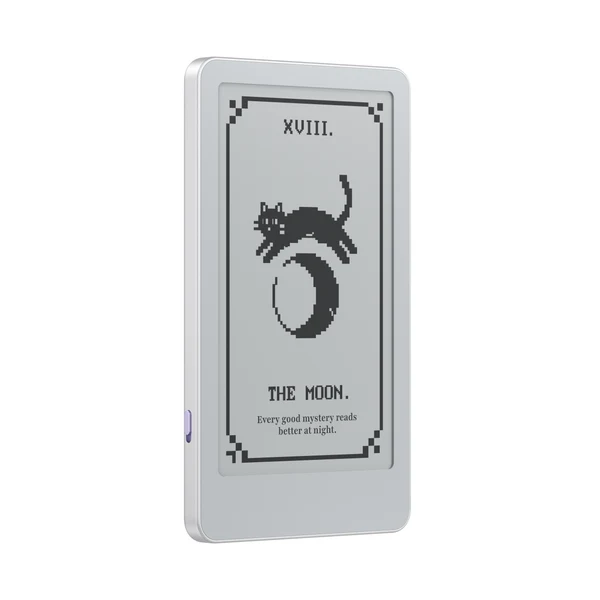
One of the biggest USP of Boox devices is its ability to run Android. The company built its reputation on Android. Its e-readers ship with Google Play, something that allows users to install both the Kindle and Kobo apps, and behave like open tablets featuring E Ink screens. So it’s notable that the company’s smallest device does the opposite.
The BOOX Picco, a 3.97-inch pocket e-reader that was first revealed at IFA 2026, runs a streamlined Linux-based system built around local files and a handful of built-in tools instead of an app store. On paper, that reads like a downgrade. In practice, dropping Android may be the decision that makes the Picco workable at its size and price, rather than a corner BOOX cut to save money.
What Exactly Is the BOOX Picco?
The Picco is a tiny card-sized e-reader measuring 105.5 x 62 x 5.5mm and weighing just about 58 grams. That makes it small enough to disappear into a coat pocket. Its 3.97-inch monochrome E Ink screen runs at 480 x 800 resolution (235 PPI), with touch input, physical page-turn buttons, and a front light with adjustable warm and cool color temperature. Storage comes from a preinstalled 16 GB microSD card, which is expandable up to 2 TB. BOOX lists the device starting from $99.99, though some stores show $109.99 for the same configuration.
The Picco, however, shouldn’t be seen as a shrunken Palma. It belongs to BOOX’s compact “Tile” line, built for short reading sessions and extreme portability rather than as an all-purpose pocket tablet.
Why Android Is Normally Central to the BOOX Experience
On BOOX’s larger readers, Android is the point. It brings Google Play on supported models, native Kindle, Kobo, and Libby apps, cloud-storage integrations, and cross-platform reading. That flexibility has a cost: more RAM and processing overhead, more background processes, and menus built for phone-sized or larger screens. Android earns its keep when a device has the screen space, battery, and hardware to support it.
A 3.97-Inch Screen Changes the Software Equation
Apps built for phones and tablets weren’t designed for a screen under four inches, especially one using E Ink’s slower refresh behavior. Menus crowd, touch targets shrink, and the scroll-heavy layouts and animations that look fine on a phone can turn sluggish on E Ink. Installing something like the Kindle app at this size would technically add flexibility, but the interface was never built for a screen this small.
Linux Lets BOOX Control the Entire Experience
The BOOX Picco operating system doesn’t mean the device behaves like a desktop computer. It’s a closed, appliance-style interface tuned to this specific hardware, and there’s no indication buyers can install standard Linux software or customize the OS the way they could on a PC. The likely benefits of that approach break down in a few ways.
A Simpler Interface
With a fixed set of tools instead of an open app ecosystem, BOOX can design every menu and button specifically for a screen this small, rather than scaling a general-purpose interface down to size.
Lower Hardware Requirements
A streamlined OS can run on lighter hardware than a full Android build needs. BOOX hasn’t published the Picco’s processor or RAM, but a smaller software stack likely helped keep the device this compact and inexpensive.
Potentially Better Battery Efficiency
Fewer background processes and a lighter OS can mean lower power draw. BOOX hasn’t published a battery-life estimate for the 920mAh cell, though, so any efficiency gain here is a reasonable expectation rather than a confirmed number.
More Predictable E Ink Performance
Optimizing page turns and refresh modes for one screen and a fixed set of built-in apps is simpler than accounting for how unpredictably third-party Android apps might handle E Ink’s quirks.
Fewer Distractions
Without general Android apps, there’s no social media, messaging, or app-switching pulling attention away from the page, reinforcing the Picco’s identity as a single-purpose reader.
What Users Give Up Without Android
The tradeoffs are real. There’s no BOOX Picco Android version to fall back on: no Google Play Store, no native Kindle, Kobo, or Libby apps, and no general-purpose Android software. Getting books onto the device depends on file transfers rather than app-based syncing. BOOX’s supported format list, which includes EPUB, MOBI, AZW3, FB2, TXT, and several others, doesn’t mean every protected file will simply open. That’s especially true for BOOX Picco Kindle books purchased through Amazon, which carry DRM the device’s format list doesn’t automatically bypass. Buyers whose libraries live inside app-based ecosystems shouldn’t assume otherwise.
How Readers Get Books Onto the Picco
BOOX lists file transfer through the BOOX Tiles app or a web interface, plus USB-C and the included microSD card. That setup suits readers with DRM-free EPUBs, public-domain titles, or independently purchased e-books. It’s a worse fit for anyone whose reading lives mainly inside the Kindle, Kobo, or Libby apps.
BOOX Picco vs Palma: Two Opposing Philosophies
BOOX’s Palma 3, officially unveiled this week, uses a 6.13-inch E Ink Carta 1200 display, an aluminum frame, active stylus support, and Android 16, starting at $339.99. The two devices represent opposite bets. The Palma 3 is bigger, pricier, and built around full Android flexibility for buyers who want a phone-sized e-paper tablet with app access.
The Picco costs roughly a third as much, is far smaller, and is deliberately narrower in scope. It isn’t a cheap substitute for the Palma line; it’s built for a different job entirely.
The Compact E-Reader Market Is Splitting in Two
Pocket-sized readers are increasingly falling into two camps: minimal, local-file-first devices like the Picco, Xteink’s X4 Pro, and PocketBook’s newly announced Q, versus Android devices like BOOX’s own Palma line that trade size and simplicity for app support. Even within the Linux e-reader camp, capability varies widely. PocketBook’s Q, for instance, pairs its Linux-based OS with Libby integration, a built-in store, and text-to-speech, while the Picco’s software sticks to a narrower set of reading and productivity tools. Not every non-Android e-reader is equally minimal.
Who Should Buy the BOOX Picco?
It fits readers with DRM-free e-book collections, people who want a pocket-sized e-reader that truly disappears into a pocket, anyone who wants fewer notifications, and existing e-reader owners looking for a lightweight secondary device.
It’s a poor fit for readers deeply invested in Kindle, Kobo, or Libby, anyone who wants a general-purpose Android device, and buyers expecting a pocket-sized Palma.
Is BOOX Picco Linux the Right Choice?
Judged as an intentionally limited, pocketable reader, BOOX Picco Linux makes sense. It lets BOOX build a simpler interface and hit a lower price without pretending every Android app would work well on a screen this small. But skipping Android is a real limitation for anyone whose books live inside commercial app ecosystems.
The Picco’s operating system isn’t a weakness or an advantage on its own. Its value depends on whether a buyer wants a tiny file-based reader or a miniature gateway into commercial ebook platforms. Whether that tradeoff is worth it comes down to how someone actually reads.
You can place your orders for the Boox Picco here.